Retainers
Written By Timothy Murenzi
Overview
A retainer is money a client pays in advance, which you then draw down as you bill. Each retainer belongs to one project and one client, and is backed by its own invoice numbered RET-code-###.
Where to find retainers
Finances → Retainers — every retainer in the studio, filterable by All, Open, Partial, Fully Disbursed and Closed, and by type, project and client. Columns: Retainer #, Date, Client, Type, Status, Amount, Received, Disbursed, Balance, Seen, Linked, QB Sync, Actions.
Project → Finances → Retainers — where most of the work happens: pool cards, the ledger, disbursement activity and Request Retainer.
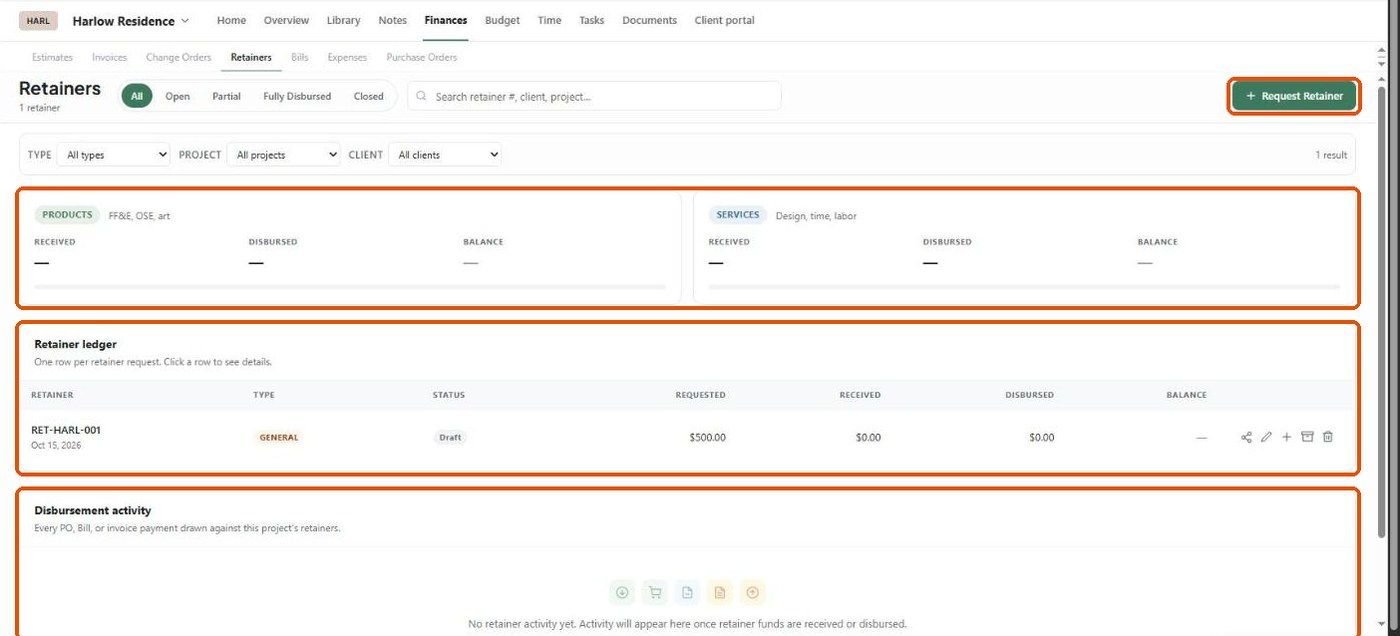
The project Retainers tab
Pool cards — Products and Services, each with Received, Disbursed and Balance.
Retainer ledger — one row per request with Type, Status, Requested, Received, Disbursed and Balance. Click a row for its details (Total, Received, Disbursed, Balance, invoice number, notes) and Activity.
Disbursement activity — every PO, bill or invoice payment drawn against the project's retainers.
Retainer types
Older retainer credits may appear as Legacy; edit them to set the right type.
Rules
A retainer can only be spent on its own project.
You can only draw what has actually been received.
Contracts with a retainer create a General retainer on the project automatically once the client pays it.
Important limitations
The project tab shows pool cards for Products and Services only; a General retainer's balance shows in the ledger.
Related articles
Creating a retainer
Applying a payment (funding the retainer)
Applying a retainer to an invoice
Refunds, un-applying, and other limits
Was this helpful?
Still need help? Ask the team