Setting Up WorkPay
Written By Timothy Murenzi
Overview
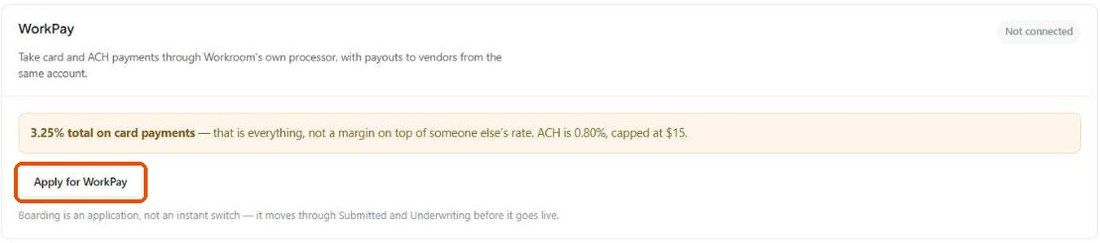
WorkPay is Workroom's own payment processor. Once approved, clients can pay invoices by card or ACH, and funds go to your business bank account. Getting it requires an application that goes through underwriting.
Pricing
Cards: 3.25% total — the Integrations page notes this is everything, not a margin on top of another rate.
ACH: 0.80%, capped at $15.
On estimates and invoices you choose per document whether to pass the fee to the client or absorb it (Fees → Processing fee).
Before you apply
Gather everything first so you can finish in one sitting:
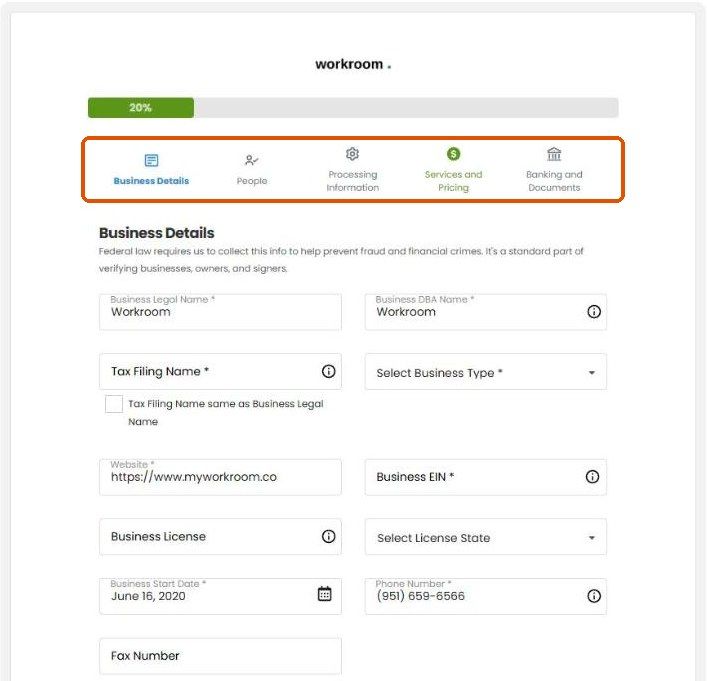
Business: legal name, DBA, tax filing name, business type, website, EIN, business licence and state, start date, phone.
People: every owner with 25% or more, plus one control person — legal name, date of birth, home address, SSN and ownership percentage.
Processing: expected monthly volume, average and largest transaction, and a clear description of what you sell (e.g. "interior design services and FF&E procurement").
Banking and documents: a business bank account in the business's legal name, plus any documents requested (see Everything WorkPay).
Steps
Click Accept Payments at the top of Workroom, or go to Settings → Studio → Integrations.
On the WorkPay card, click Apply for WorkPay.
The application opens on our payment partner's secure page, pre-filled with your company details. Work through the five steps: Business Details, People, Processing Information, Services and Pricing, Banking and Documents.
Submit.
What happens next?
Boarding is an application, not an instant switch: it moves through Submitted and Underwriting before it goes live. The WorkPay card shows the current status. Respond quickly to any document requests.
Tips for a fast approval
Make the legal name, address and EIN match your IRS and bank records exactly — mismatches are the most common cause of delays.
Use a business (not personal) bank account.
List every 25%+ owner.
Have a working website or public profile.
Give realistic volume estimates based on your actual invoicing.
Important limitations
Stripe is also available on the same page (Workroom adds 0.65% on top of Stripe's own fee).
Approval time varies with business type and whether more documents are needed.
Related articles
Everything WorkPay
Taking payments on an estimate
Was this helpful?
Still need help? Ask the team