Invoices & Payments Report
Written By Timothy Murenzi
Overview
The Invoices & Payments Report is your accounts-receivable picture: what you've billed, what's been collected, and what's still owed. Open it from Reports → Invoices + Payments.
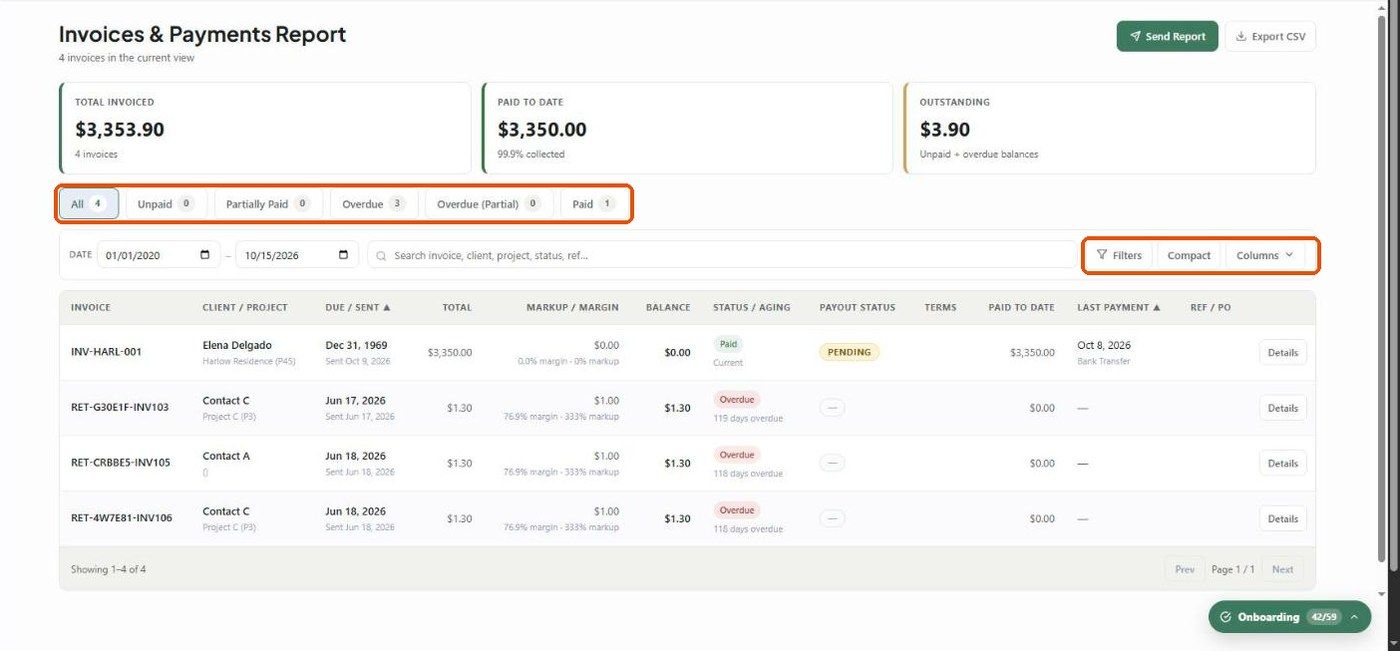
KPI cards
Total Invoiced — the total of every invoice in view, with the count.
Paid to Date — total collected, with the % collected.
Outstanding — unpaid and overdue balances.
Status tabs
All, Unpaid, Partially Paid, Overdue, Overdue (Partial) and Paid, each with a count.
Columns
Invoice, Client / Project, Due / Sent, Total, Markup / Margin, Balance, Status / Aging (e.g. 119 days overdue), Payout Status, Terms, Paid to Date, Last Payment (date and method) and Ref / PO. Use Columns to show or hide them, and click a header to sort.
Filters
Date range — the date the invoice was sent — and search by invoice, client, project, status or reference.
Filters — minimum and maximum amount, terms, last payment method, and aging bucket (Current, 1–30, 31–60, 61–90, 90+).
Compact — toggles row density. Your column choices are remembered.
Drill-down
Click Details on a row to see the client and the invoice's full payment history (date, amount, method, reference).
What to understand
Paid means the balance is essentially zero (≤ $0.01), or the invoice is marked paid.
Aging only counts while a balance remains.
Payout Status (Pending → In Transit → Funded) tracks when processor money reaches your bank. It's separate from whether the client has paid, and shows "—" for cash or check.
Related articles
Deposits Report
Reports — Overview
Was this helpful?
Still need help? Ask the team