Deposits Report
Written By Timothy Murenzi
Overview
The Deposits Report tracks customer deposits collected on estimates before they become invoices. Open it from Reports → Deposits.
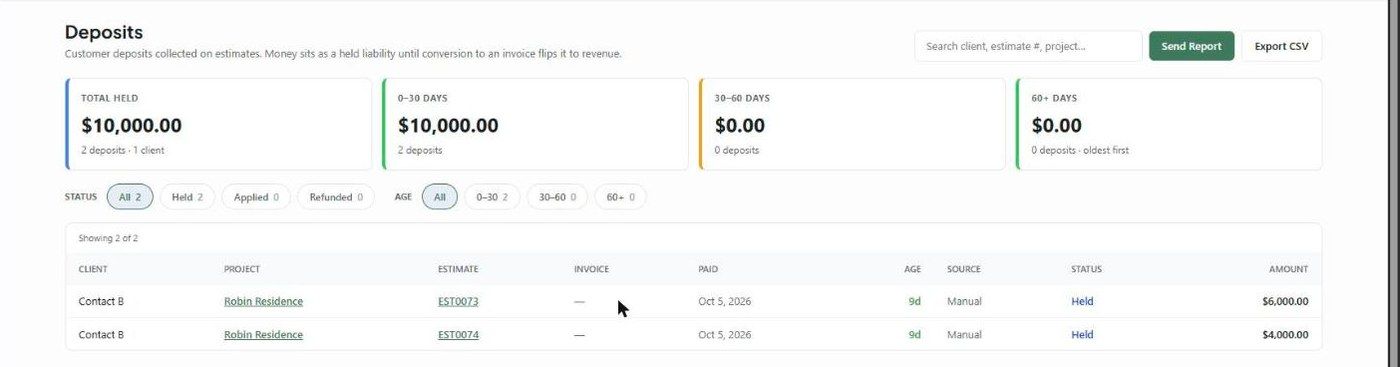
KPI cards
Total Held, plus three age buckets — 0–30 Days, 30–60 Days and 60+ Days — each with an amount and count. The 60+ card changes colour based on your oldest held deposit.
Columns
Client, Project, Estimate and Invoice — Project, Estimate and Invoice are links.
Paid (payment date) and Age (colour-coded).
Source (Manual, WorkPay and so on).
Status: Held, Applied or Refunded.
Amount — struck through if refunded.
Filters
Status: All, Held, Applied, Refunded
Age: All, 0–30, 30–60, 60+
Client pills (when you have more than one client)
Search by client, estimate number or project
What to understand
A deposit collected on an estimate is money you're holding, not revenue. It stays Held until the estimate becomes an invoice, then flips to Applied. That's why deposits have their own report, separate from Invoices & Payments.
Related articles
Invoices & Payments Report
Was this helpful?
Still need help? Ask the team