Conditions: running only when it matters
Written By Timothy Murenzi
Conditions are optional filters. They stop an automation from firing in situations you didn't intend — for example, only alerting you about large invoices.
Two places to add a condition
On the trigger — click the Trigger card and use Only run if (optional) in the Node Configuration panel. If the condition isn't met, the automation doesn't start.
Mid-way, with an "Only if…" step — click + Add step → Only if…. This step splits the automation into a YES path and a NO path, so you can check something after a delay (e.g. "is the invoice still unpaid?").
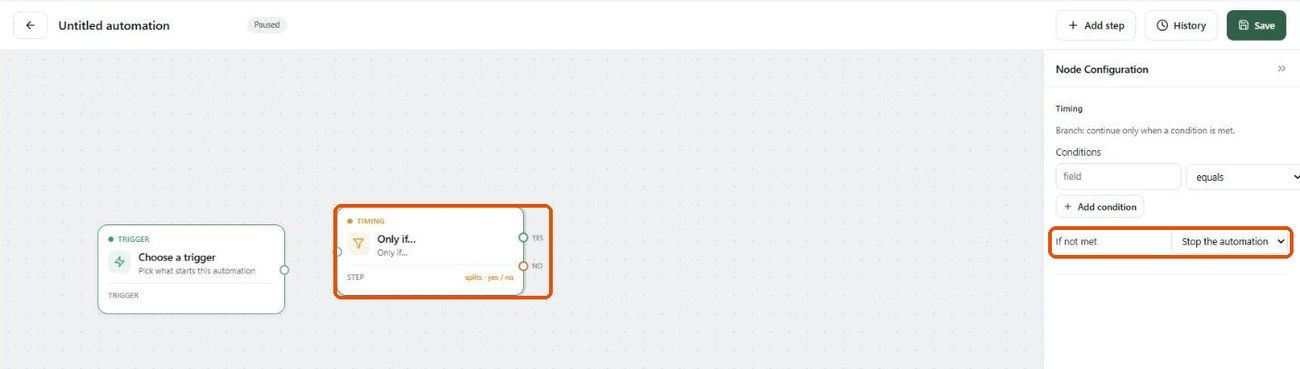
Setting up a condition
Type the field to check (e.g. amount, status).
Choose an operator.
Enter the value to compare against.
Click + Add condition to add more. All conditions must be met.
On an Only if… step, choose what happens If not met: Stop the automation (nothing else runs) or Skip to the end (skip the remaining steps and finish cleanly).
Operators
Examples
Invoice created → only if amount greater than 5000 → notify the owner.
Project status changed → only if status changed to On Hold → email the client.
Form submitted → only if the Budget answer is not empty → create a lead task.
Start broad, then tighten. Build without conditions first and watch the run history. If it fires too often, add a condition. It's easier to tighten a working automation than to debug one that never runs.
Was this helpful?
Still need help? Ask the team