Settings & Automation
Written By Timothy Murenzi
Studio-wide contract settings are in Settings → Studio → Contracts. The page has three tabs: Document defaults, Contract templates and Section templates.
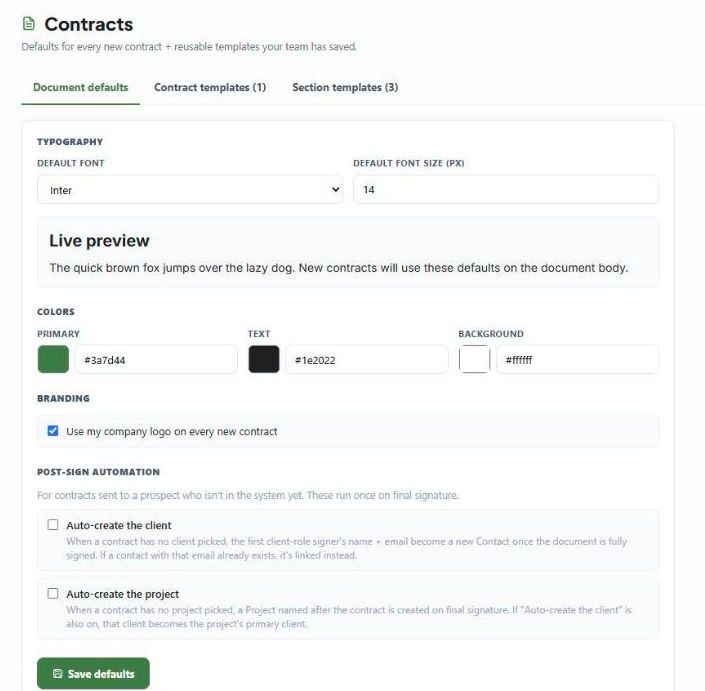
Document defaults
These are the starting look for every new contract.
Default font — Inter, Lato, Roboto, Roboto Light, Open Sans, Source Sans Pro, Montserrat, Poppins, Urbanist, Playfair Display, Merriweather, Georgia, Times New Roman or Arial.
Default font size (px) — for example 14.
Colors — Primary (headings and accents), Text and Background. Pick a colour or type a hex code.
Branding — Use my company logo on every new contract.
The Live preview updates as you change these. Click Save defaults when you're done.
Defaults apply only to contracts created after you save. Existing contracts keep the look they had.
Post-sign automation
These options are for contracts sent to a prospect who isn't in Workroom yet. They run once, when the final signature is in. Both are off until you tick them.
Auto-create the client — if the contract has no client, the first signer with the Client role becomes a new Contact, using their name and email. If a contact with that email already exists, it's linked instead of duplicated.
Auto-create the project — if the contract has no project, a new Project is created and named after the contract. If Auto-create the client is also on, that client becomes the project's primary contact.
Example with both on
Create a contract with no client and no project.
Add the prospect as a signer with the Client role.
Send it. When they sign, Workroom creates the contact and the project, and links them together.
Contract templates and Section templates
These tabs list your studio's saved templates, with a count on each tab (for example Contract templates (1), Section templates (3)). See Saved Templates & Walter.
Related settings
Payments for retainers: Settings → Studio → Integrations (Stripe or WorkPay). See Retainer Payments.
Who can use Contracts: Settings → Studio → Team and rates → Permission sets → Money → Contracts.
Troubleshooting
No contact was created after signing. Check three things: the contract had no client, the signer's role was Client, and the signer had both a name and an email.
The new project is empty. That's expected. Only the name is set — add the address, dates and team yourself.
My new font isn't on an old contract. Defaults only affect new contracts.
Was this helpful?
Still need help? Ask the team