Sharing a public timeline link
Written By Timothy Murenzi
Share a read-only, always up-to-date timeline with a client — no login required. You choose exactly what they see.
Create a link
Open Tasks, click ⋯ (top right) → Public links.
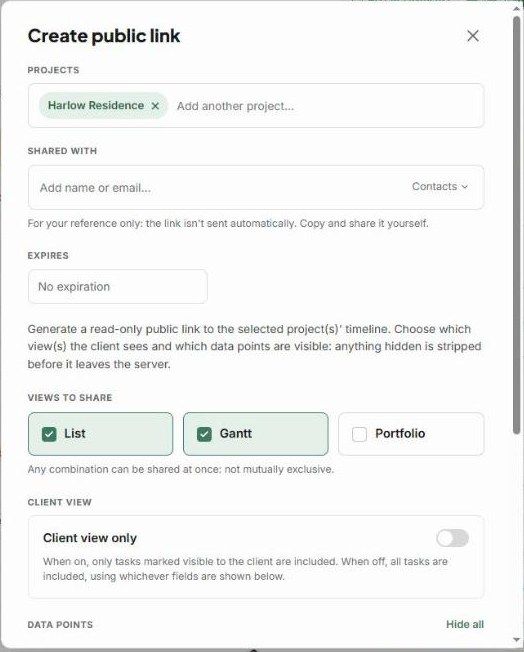
Projects — the current project is added. Add more if you like.
Shared with — optionally note who it's for. This is for your reference only: the link isn't sent automatically.
Expires — No expiration, or pick a date.
Views to share — List, Gantt and/or Portfolio. Any combination works.
Client view only — when on, only tasks marked visible to the client are included.
Data points — choose what's visible: estimated hours, logged hours, progress %, assignees, dates, phases, dependencies, task descriptions, priority, status and tags. Use Hide all to start from nothing. Anything hidden is removed before the page is served.
Click Create link & continue, then copy the link and send it yourself.
What happens next?
The client opens a read-only page that always shows the current plan.
Manage or revoke links from ⋯ → Public links.
Public link or PDF?
Use a public link for a live view the client can revisit. Use Export a PDF for a fixed snapshot. See Importing & exporting.
Important limitations
Workroom doesn't email the link — copy it and send it yourself.
Anyone with the link can view it until it expires or you remove it.
Was this helpful?
Still need help? Ask the team