Understanding the Design Overview
Learn how the Design Overview functions as the operational command center for project execution.
Written By Julia M.
Overview
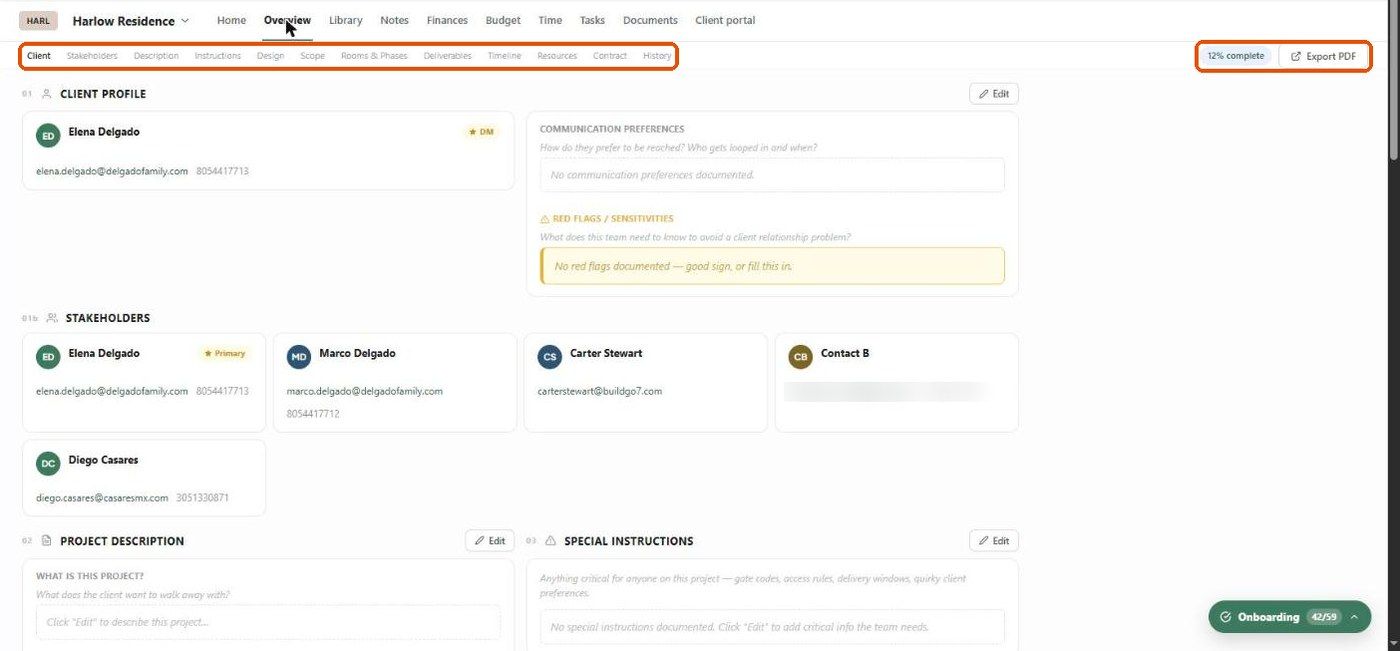
The Overview tab — the Design Overview — is the project's source of truth: who the client is, what they want, what's in scope, what's been decided, and where everything lives. When a new team member joins or a contractor needs a briefing, this is the page to share.
Sections
Jump to any section from the bar at the top. A completion badge shows how much is filled in (e.g. 12% complete).
Click Edit on a section to fill it in.
Export to PDF
Click Export PDF (top right) to make a handoff document for the team, a client summary or a contractor package. You can choose which sections to include.
Best practices
Treat it as a living document — update it as decisions are made.
Fill in Special Instructions and Hard no's first. They prevent the costliest mistakes.
Agree studio standards for naming deliverables, milestones and scope.
Related articles
Managing Client Profiles in Projects
Documenting Design Direction
Managing Scope of Work
Managing Deliverables and Milestones
Using Resources and References
Was this helpful?
Still need help? Ask the team