Retainer Payments
Written By Timothy Murenzi
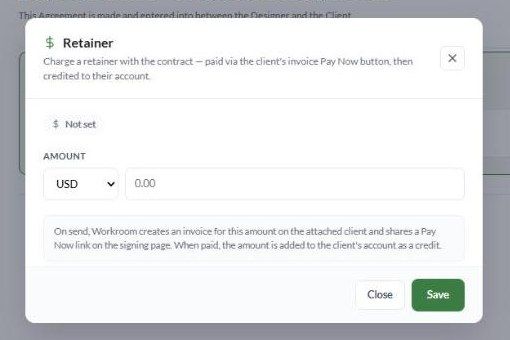
A retainer lets you collect a deposit with the contract. When you send the contract, Workroom creates an invoice for the retainer amount and puts a Pay Now link on the signing page. When the client pays, the money is added to their account as a credit, ready to apply to future invoices.
Before you start: accept payments
To take card payments, connect a payment processor in Settings → Studio → Integrations:
Stripe — click Connect with Stripe. Workroom adds 0.65% on top of Stripe's own processing fee.
WorkPay — Workroom's own processor. Card payments cost 3.25% in total, and ACH costs 0.80% capped at $15. Click Apply for WorkPay. Approval goes through Submitted and Underwriting before it's live.
You can also use the Accept Payments button at the top of Workroom.
Add a retainer to a contract
Make sure the contract has a Client. The credit needs a client account to go to.
In the editor header, click Retainer.
Choose the currency: USD, CAD, EUR, GBP or AUD.
Enter the Amount and click Save. The dialog shows Not set until an amount is saved.
What happens on send
Workroom creates an invoice for the retainer amount for the linked client.
The signing page shows the invoice's Pay Now link.
The client pays by card through your payment processor. They can pay before or after signing.
Once paid, the invoice is marked paid and the amount is credited to the client's account.
Using the credit
When you next invoice that client, apply the available credit to the invoice the same way you'd apply any payment. Find the retainer invoice in Finances.
Troubleshooting
The client can't see a Pay Now link. Check that a payment processor is connected, a client is linked, and the retainer amount was saved before you sent.
The client paid but it still shows unpaid. Payment confirmations can take a minute. Refresh, then check the invoice in Finances.
I set the wrong amount. You can't change the retainer after sending. Adjust the invoice in Finances, or delete the contract and send a corrected one.
Was this helpful?
Still need help? Ask the team