Claude Connector
Written By Timothy Murenzi
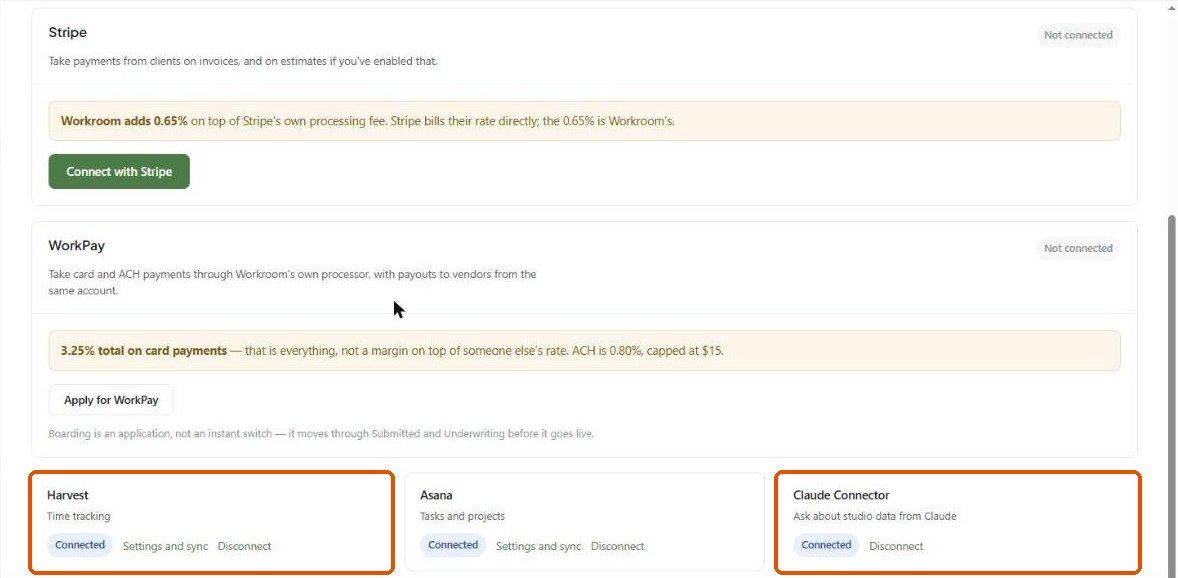
The Claude Connector links Claude, Anthropic's AI assistant, to your Workroom workspace. You can then ask Claude about your projects, invoices, estimates, purchase orders, contacts and timelogs in plain English, and it reads live data from your account. The connection uses OAuth, so your Workroom password is never shared.
Want an assistant inside Workroom instead? Use Walter (AI Project Insights at the top of the sidebar). See Walter – Your AI assistant.
Where to find it
Settings → Studio → Integrations. The Claude Connector card ("Ask about studio data from Claude") shows Connected and a Disconnect link once it's set up.
What you need
A Claude account at claude.ai. The free plan works, as do Pro, Team and Enterprise.
Owner or admin access to your Workroom account — the connection is account-wide.
Connect
In Claude, add the Workroom connector, or start from the Claude Connector card in Settings → Studio → Integrations.
Sign in to Workroom when asked and review what Claude may read and write.
Click Authorize. The card in Workroom then shows Connected.
What Claude can see and do
Write actions: Claude can add a note or a task to a project, and only when you ask it to. Estimates, invoices and POs are read-only through the connector.
Example questions
"Which of my active projects haven't logged time this week?"
"Which clients owe me money over 30 days?"
"What POs are open with Four Hands?"
"How many hours did Andrea log on Harlow Residence last month?"
"Add a note to the Harlow project that the client approved the dining chairs today."
Security
OAuth, not passwords. Access is limited to the modules above — no settings, members, permissions or billing.
Claude only queries Workroom when you ask a question. Notes and tasks it adds are logged on the project.
Disconnect on the card revokes access immediately.
Troubleshooting
Claude says it can't see my data. Check the card says Connected. If it does, reconnect the Workroom connector in Claude to refresh its tools.
The authorize window didn't come back to Workroom. Allow pop-ups for claude.ai and Workroom, then try again.
Claude won't edit an invoice. That's intentional — financial documents are read-only through the connector.
Was this helpful?
Still need help? Ask the team