Project Codes
Written By Timothy Murenzi
Overview
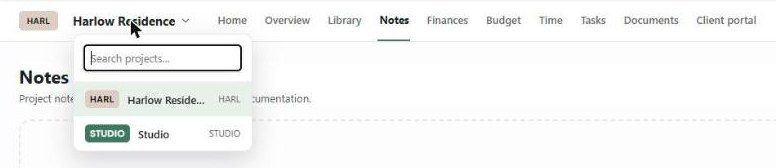
Every project has a short code — usually an abbreviation of the project or client, like HARL for Harlow Residence. It identifies the project everywhere in Workroom and appears in document numbers.
Where you'll see it
On project cards and in the projects list, as a coloured badge.
In the project header and the project switcher.
In Tasks, Comms and the Calendar.
In document numbers, e.g. EST-HARL-001.
Set the code
New projects: enter it in Code on the Basics & contacts step. It's required.
Existing projects: All Projects → ⋯ → Edit Project.
Rules
Keep it short and memorable — letters and digits.
Each project in your studio needs its own code.
Important limitations
Changing a code doesn't renumber documents that already exist. They keep the code they were created with.
Related articles
Creating a Project
Document Naming
Was this helpful?
Still need help? Ask the team