Reporting A Bug
How to report issues with indema
Written By Timothy Murenzi
We know bugs slow your work down. This article explains how to report one and how we handle it, so you know what to expect.
How to report a bug
Click Get Support at the top of the left sidebar.
Under Submit ticket, choose Bug Report or Issue.
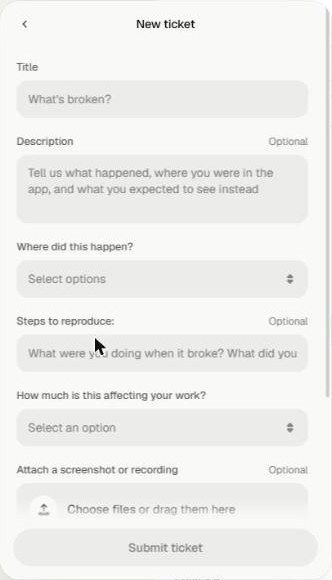
Fill in the form:
Title — what's broken?
Description (optional) — what happened, where you were in the app, and what you expected to see.
Where did this happen? — the area of Workroom.
Steps to reproduce (optional) — what you were doing when it broke.
How much is this affecting your work?
Attach a screenshot or recording (optional, but very helpful).
Click Submit ticket.
The more detail you give, the faster we can fix it. A thin report means we have to come back to you for more, which adds delay. See How to Write a Support Request That Gets Solved Faster.
What happens after you report
1. Is it a bug or a how-to?
First we check whether it's a workflow question. If so, we send you a walkthrough or a recording of us doing the task.
2. Is it just your account, or everyone's?
We reproduce it on your account, then on our development account. If it happens there too, it affects every user.
3. How urgent is it?
If a release that changes that area is coming soon, we may hold the fix until it ships. If the bug is still there afterwards, it becomes critical.
4. Investigate
We work out why it's happening. Depending on the bug, this can take some time.
5. Fix and verify
We fix it, confirm the fix on our development site, then release it. If the fix doesn't hold, we go back to step 4.
Our promise
We know a bug can be urgent when a client deadline is close. Some issues need investigation and code changes that can't be done instantly, but we'll keep you updated until it's resolved. You can follow your tickets under Messages in the Get Support panel, and see shipped fixes under Updates.
Was this helpful?
Still need help? Ask the team