Scheduling your onboarding.
Let's get you started for success with scheduling your onboarding with the team.
Written By Indema Support
Congratulations on signing up for Workroom! The next step is your onboarding session. In it, we set up your studio with you, answer your questions, and plan how Workroom will replace the tools you use today.
Book your session
If you haven't booked onboarding yet, use the booking link in your welcome email, or ask us through Get Support (top of the left sidebar) → General Support. On Pro and Concierge plans, go-live with a specialist is part of your plan.
Get a head start with the Setup Guide
You can start before your session. Click Onboarding at the bottom right of any page to open the Setup Guide. It shows your progress (for example 71% · 42 of 59 items complete) and walks you through setup in order — each section unlocks the next:
Your Profile — name, photo, contact details, timezone
Your Studio — branding, contact details, emails, status labels
Your Team — invite teammates and set permissions. Solo studios can dismiss this section.
Work & Projects Setup — FF&E categories, rooms, phases, service types
Finance Setup — document defaults, billing options, budget defaults
Integrations — payment processor and accounting software
Import contacts and vendors
Set Up Your Product Catalog — add products, try the FF&E Schedule export and CSV import
Create Your First Project
Send Your First Estimate
Create Your First Invoice
Log Your First Hours
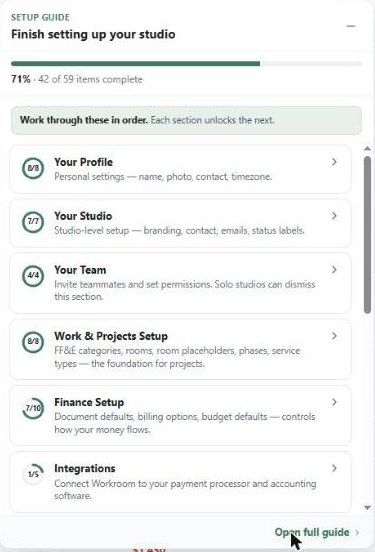
Click Open full guide for the full-page version. The Dashboard also has a Finish setting up your studio card with the next recommended step. For a studio-wide checklist, see Settings → Studio → Setup checklist.
What onboarding covers
Initial setup — settings, your logo on documents, and your payment processor.
Team training — guided sessions on how each role uses Workroom.
Workflow — deciding exactly how Workroom replaces your old process for proposals, invoicing, time tracking and client communication.
Ongoing support — where your team finds answers afterwards: this help center, Get Support, and Walter (AI Project Insights).
Why it matters
Get your money's worth. Teams that skip onboarding drift back to spreadsheets and email, and never use the product clipper, proposals, project accounting or the client portal.
Consistency across the team. Everyone creates projects, POs and client notes the same way, so anyone can pick up a project.
Faster adoption. A planned session cuts weeks of trial and error.
A better client experience. Proposals go out faster, invoices are clean, and conversations live in the client portal.
Come prepared
Your logo and studio details (address, currency, timezone)
A list of team members and their roles
Your service types and hourly rates
Contact and vendor lists (CSV if you have them)
Your QuickBooks and Stripe logins, if you use them
Was this helpful?
Still need help? Ask the team