Managing Product Financials
Track firm costs, client pricing, freight, fees, profit, and variance for individual products.
Written By Julia M.
Overview
Every product has a full cost and price breakdown — what it costs you, what the client pays, and your profit.
Edit pricing
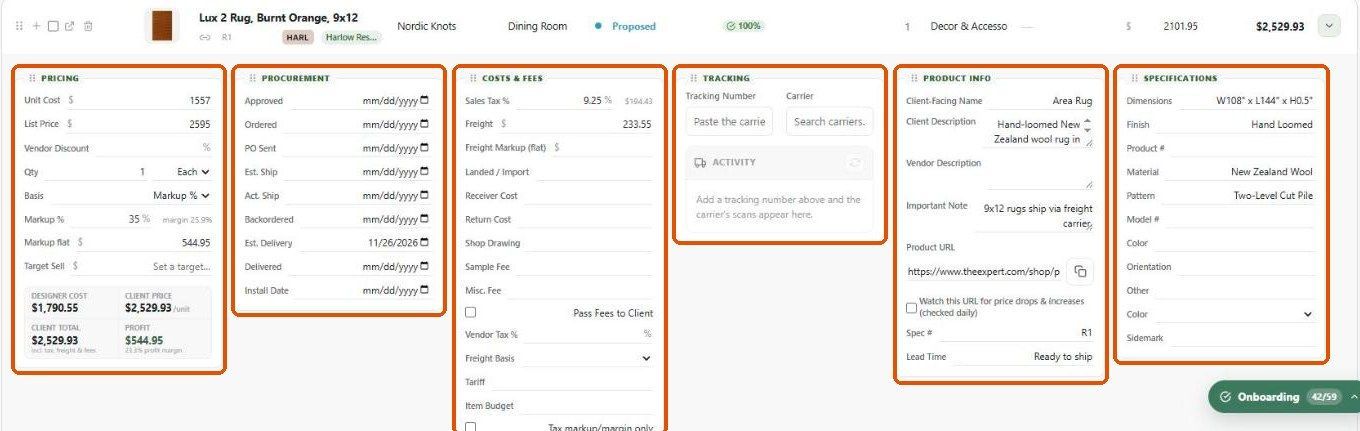
Expand the product row (or open the product → Pricing):
Unit Cost, List Price, Vendor Discount %.
Qty and unit (Each, Feet, Yards, Square Feet, Roll, Hour, and more).
Basis: Markup % or Margin %, the rate, and the resulting flat amount.
Target Sell — optional target price.
The summary underneath shows Designer Cost, Client Price, Client Total (incl. tax, freight and fees) and Profit with profit margin.
Costs and fees
Sales Tax %, Freight, Freight Markup (flat), Landed / Import, Receiver Cost, Return Cost, Shop Drawing, Sample Fee, Misc. Fee, Pass Fees to Client, Vendor Tax %, Freight Basis (flat, % of unit cost, % of client price), Tariff, Item Budget, and tax switches (markup/margin only, freight, landed).
The Financials tab
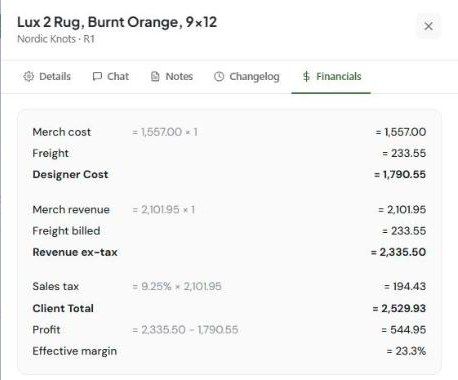
Open the product and click Financials for the worked calculation: merch cost, freight, Designer Cost; merch revenue, freight billed, revenue ex-tax; sales tax, Client Total, Profit and Effective margin.
Best practices
Update costs when the vendor confirms them.
Track freight separately from unit cost.
Use Item Budget to compare against the client's allowance.
Related articles
Markup vs. margin: what's the difference?
Bulk Editing Products
Was this helpful?
Still need help? Ask the team