Troubleshooting
Written By Vinod Kumar Alluri
Work through the section that matches what you're seeing. Most calendar problems come from a filter, a permission, or the record behind the chip — not the calendar itself.
The calendar looks empty
Check the lens. A lens like Money or Milestones hides every other layer. Click All.
Check the layer checkboxes in the left panel — and expand What is in it, since a sub-filter may be unticked (Deliveries shows only Install dates by default).
Check the Projects list. If you clicked Only on a project, everything else is hidden. Re-tick the other projects.
Check the date range. Click Today to jump back to the current period.
Look at the subtitle under the page title (e.g. ALL PROJECTS · 0 IN VIEW) — it tells you how many items the current filters allow.
If Calendar doesn't appear in your left sidebar at all, it hasn't been enabled for your workspace — contact your workspace admin or Workroom support.
A whole layer is missing
Permissions, not preferences. Deliveries, Order-by and Procurement admin require procurement access; Money requires finance access. Check the person's permission set in Settings → Studio → Team and rates, not the calendar.
My Google/Outlook events aren't showing
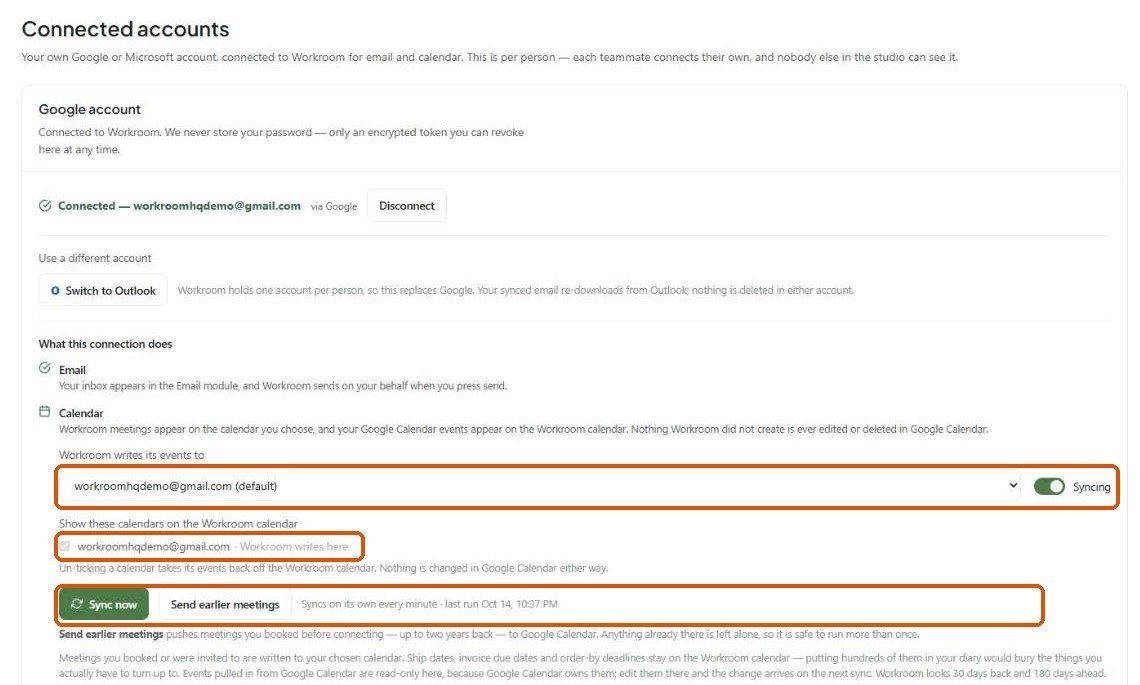
Work down this list in Settings → You → Connected accounts:
Is the account connected? You should see Connected — your address.
Does the panel say "Reconnect to add the calendar"? Your connection predates calendar access — click Disconnect and connect again.
Is a calendar chosen under Workroom writes its events to, and is the Syncing toggle on?
Is the calendar ticked under Show these calendars on the Workroom calendar?
On the Calendar page, is it ticked under Connected calendars in the left panel? Unticking there hides it.
Are the events inside the sync range — 30 days back, 180 days ahead?
Click Sync now and check the status line underneath (it shows the last run, or an error).
A meeting I created didn't reach Google/Outlook
Is it a meeting? Only meetings are sent. Ship dates, due dates and order-by dates stay in Workroom.
Are you the creator or an attendee? Workroom writes the meetings you booked or were invited to.
Is it older than 30 days? Use Send earlier meetings in Connected accounts.
Did it come from your calendar originally? Pulled-in events are never sent back, by design.
Give it a minute, then click Sync now.
Duplicate events on the calendar
Workroom automatically retires duplicates it finds every few minutes. If you still see doubles, check whether the same underlying calendar is ticked twice under Connected calendars (for example a shared calendar you also subscribe to personally), and untick one.
An event shows at the wrong time
Almost always the studio time zone. Check Settings → Studio → Company → Regional defaults → Timezone. Calendar times are stored in studio time, so if it's wrong, everything is consistently off.
Also check the Calendar's ⚙ → Time zone: it controls which zone the grid is drawn in. If you've set a Secondary zone, make sure you're reading the right time column.
If an all-day event looks a day too long or a day off, please report it to support — Google treats all-day end dates as exclusive and Workroom converts them, so this shouldn't happen.
I can't edit or drag an event
Events pulled in from Google or Outlook are read-only in Workroom. Edit them in the calendar that owns them; the change arrives within a minute.
Money, milestones, tasks and procurement admin chips can't be dragged — change the invoice, project or task instead.
Dragging works in Month view and changes only the date. To change the time, open the event and click Edit event.
A guest didn't get an invitation
Team members are not sent a Google/Outlook invitation — the meeting is already on their Workroom calendar.
Contacts need an email address on file. No address, no invitation.
Typed-in names (e.g. "Sarah's architect") are kept as notes on the event only.
The invitation comes from your connected calendar, so it only goes out once the meeting has synced. Check that your calendar is connected and syncing.
Unticking a calendar removed it from my connection
It doesn't. Unticking under Connected calendars is only a filter — it hides that calendar's events and leaves the connection alone. Renaming a calendar is display-only too.
The calendar page is blank or shows an error
Hard-refresh the page first (Ctrl + Shift + R on Windows, Cmd + Shift + R on Mac) — after an update, an old cached version is the usual cause. If it persists, contact support with the exact error text.
Order-by dates look wrong
Check, in order: the product's install date, the product's vendor lead time (a range like "8–10 wks" uses the longer end), and the receiving buffer — the studio default or the project's override in Settings → Studio → Calendar. The order-by date is calculated from those three and nothing else. See Dates that move on their own.
Was this helpful?
Still need help? Ask the team