Markup vs. margin: what's the difference?
Understanding the difference between markup and margin and how each affects your product pricing.
Written By Julia M.
Overview
Markup and margin both add profit to cost, but they're calculated differently. The same percentage gives a different price.
Markup
Client price = Cost × (1 + Markup %)
Cost $1,000 at 30% markup → $1,300. Profit $300, which is 30% of cost.
Margin
Client price = Cost ÷ (1 − Margin %)
Cost $1,000 at 30% margin → $1,428.57. Profit $428.57, which is 30% of the price.
Where they live in Workroom
Line items use a markup percentage (Mkup (%)) on each line.
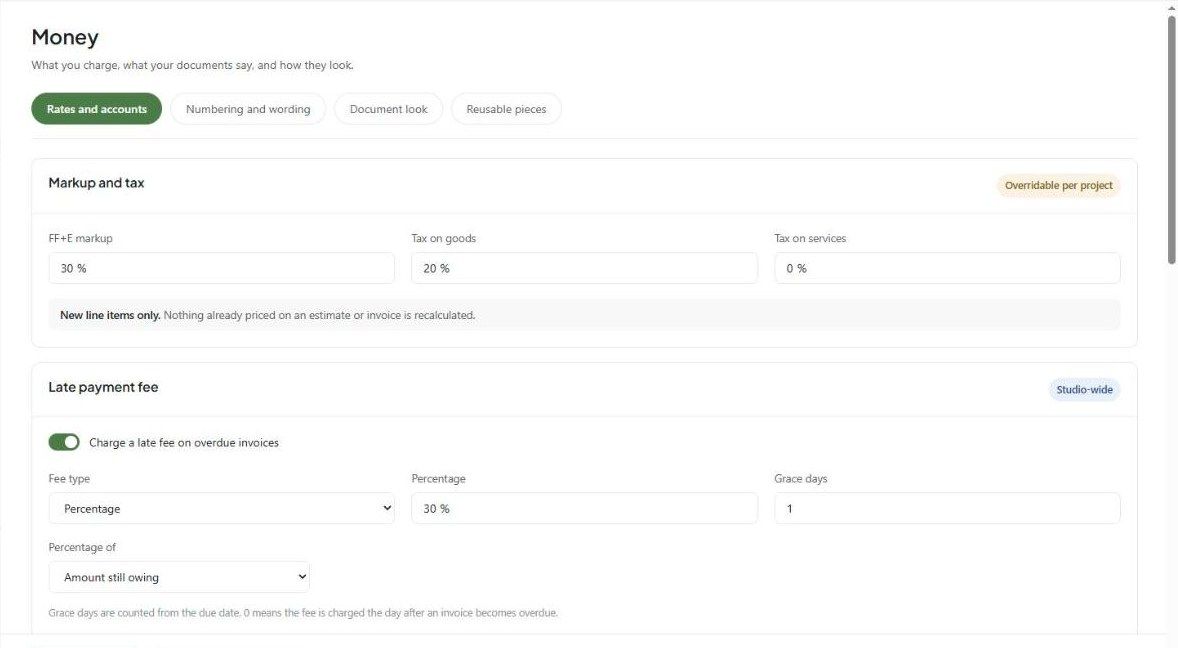
The studio default markup is FF+E markup in Settings → Studio → Money → Rates and accounts (overridable per project). It applies to new lines only.
Target margins on the same tab (Design fee, FF+E, Freight, Warehousing) are for reporting — changing a target never changes a price.
The estimate/invoice summary bar (Show Details) shows both Markup and Margin, and the quick view panel's Cost Analysis shows Gross Profit and Margin.
Tips
Pick one method and use it consistently so projects are comparable.
Keep Markup / Margin off in Client View unless you intend to show it.
Related articles
How to set up fees, payment schedule, and terms on an estimate
How to configure the client view on an estimate
Was this helpful?
Still need help? Ask the team