How estimates convert to invoices and invoices convert to purchase orders
Understanding the document chain from estimate approval through to purchase orders and client payment.
Written By Julia M.
Overview
Estimates, invoices and purchase orders are connected. A client approves an estimate, you bill the approved work on an invoice, and you order the products from vendors with purchase orders. Linked records show in each document's Linked column.
The workflow
Estimate. Build it, configure the client view, and send it.
Client approval. The client approves items, sections or the whole estimate and signs in the Authorize & Sign dialog.
Invoice. The approved items are billed on an invoice. Review it before sending — check client view settings, markup visibility, payment schedule and terms.
Payment. Record payments on the invoice (or the client pays online). The balance updates and the status moves to Paid at zero.
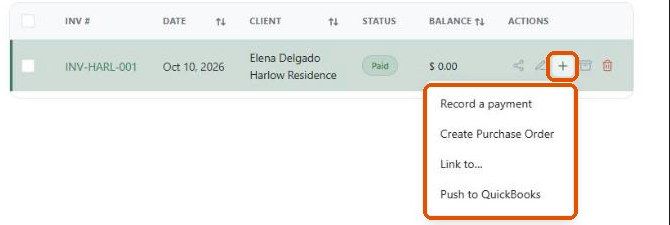
Purchase orders. From the invoice row, click + → Create Purchase Order.
Linking records by hand
Use + → Link to… on an invoice or retainer row to connect it to a related record.
Important limitations
Only approved estimate items should be billed. Items marked Not Approved stay on the estimate.
Purchase orders are created on request, not automatically.
Products without a vendor can't be placed on a vendor purchase order.
We didn't complete a live approval during this review, so confirm on your account whether the invoice is created automatically and whether it starts as a Draft.
What happens next?
Use the Linked column and the Activity tab on each record to trace an item from estimate to invoice to purchase order.
Related articles
How the client reviews and approves an estimate
How to Create a Purchase Order from an Invoice
How to Record a Payment on an Invoice
Was this helpful?
Still need help? Ask the team