How to Create a Purchase Order from an Invoice
Generate a purchase order directly from an invoice to streamline procurement for invoiced items.
Written By Timothy Murenzi
Overview
Turn the products on an invoice into vendor purchase orders without re-entering them.
Before you start
Each product needs a vendor in the Library — products without a vendor can't go on a vendor PO.
Steps
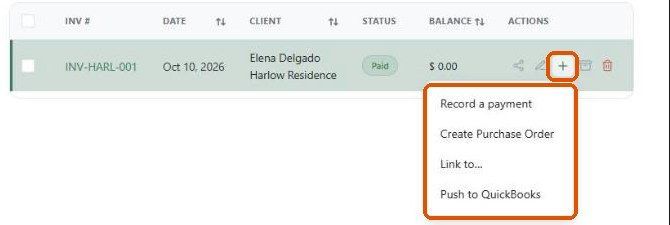
Go to Finances → Invoices and hover the invoice row.
Click + → Create Purchase Order.
Review the purchase order(s) under Finances → Purchase Orders before sending.
What's carried over
Product names, descriptions and quantities.
The project and client.
The vendor from the product.
Important limitations
Only products are carried over — services and time aren't ordered from vendors.
Creating a PO doesn't send it to the vendor.
Later changes to the PO don't update the invoice.
Related articles
How estimates convert to invoices and invoices convert to purchase orders
Overview of Invoices
Was this helpful?
Still need help? Ask the team