Understanding the Projects Module
Learn how the Projects module centralizes operational project management inside Indema.
Written By Julia M.
Overview
Projects is the hub for each client job. One project brings together the client, addresses, rooms, phases, products, notes, money, time, tasks, documents and the client portal. Everything inside a project is filtered to that project.
Where to find it
Click All Projects under PROJECTS in the left sidebar.
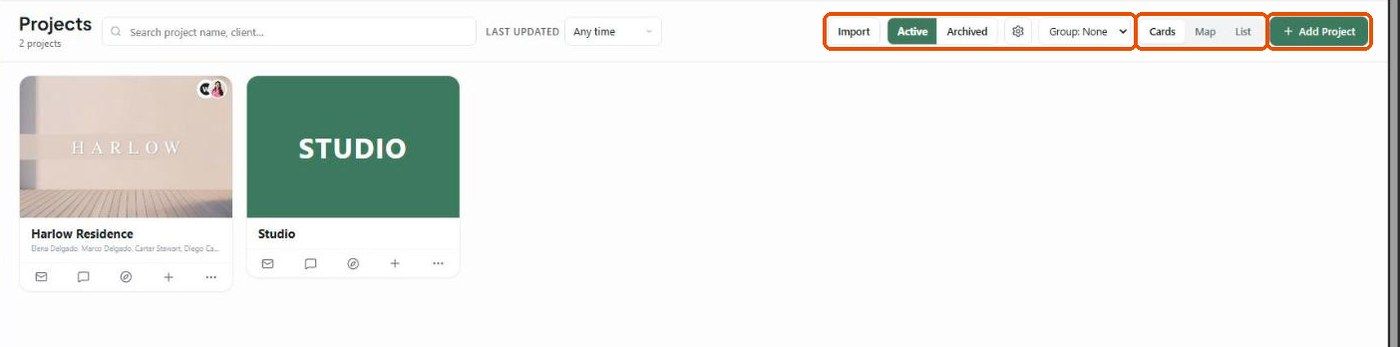
The Projects page
Search by project name or client, and filter by Last updated (any time, last 7/14/30 days, or 30+ days ago).
Active / Archived — switch between current and archived projects.
Group — None, Phase or Status.
Layouts — Cards, Map or List.
The gear chooses what shows on cards: status pill, phase pill, retainer, timelog, alerts, address, and the email, chat, navigation and create icons.
Import and + Add Project.
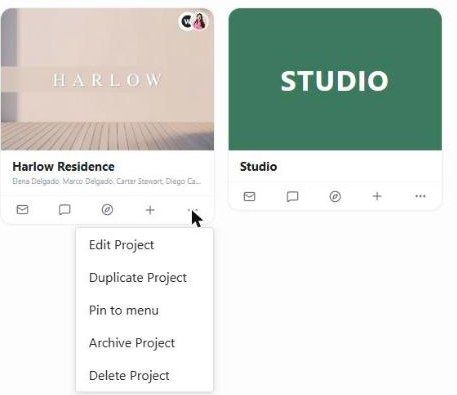
Each card or row has quick icons — email, chat, navigate (directions) and + (create a record for this project) — plus a ⋯ menu: Edit Project, Duplicate Project, Pin to menu, Archive Project and Delete Project.
Inside a project
Open a project to see its tabs:
Use the project name's ▾ switcher to jump to another project without going back to the list.
Important limitations
Deleting a project is permanent. Archive it instead if you might need it again.
Related articles
Creating a Project
Navigating the Project Dashboard
Understanding the Design Overview
Understanding Project Statuses
Was this helpful?
Still need help? Ask the team