Navigating the Project Dashboard
Learn how the Project Dashboard provides operational visibility into project progress and execution.
Written By Julia M.
Overview
A project's Home tab is its dashboard: a quick read on progress, products, people and what's coming up.
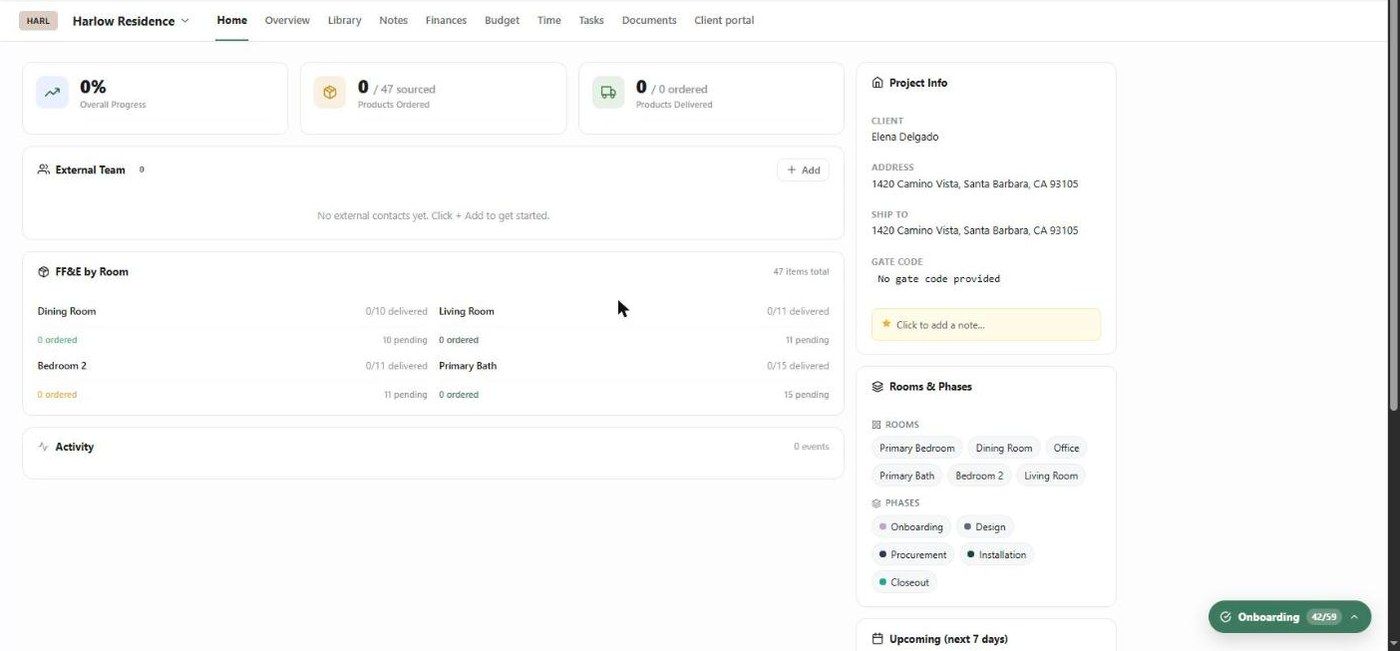
What's on it
Overall Progress, Products Ordered (e.g. 0 / 47 sourced) and Products Delivered (e.g. 0 / 0 ordered).
External Team — architects, contractors, trades and consultants on the job. Click + Add.
FF&E by Room — per room, how many items are delivered, ordered and pending.
Activity — recent events on the project.
Project Info — client, address, ship-to, gate code, and a pinned note (Click to add a note…).
Rooms & Phases — the project's rooms and phases.
Upcoming (next 7 days) — meetings and tasks due soon, with who's on them.
How progress is calculated
Overall Progress follows product delivery. If a project has 4 products and 1 is delivered, progress is 25%. Task completion is tracked separately in Tasks (e.g. 6 of 50 done).
Important limitations
The product tiles only count products added to the project's Library with a status.
Related articles
Understanding the Design Overview
Getting started with Work In Progress (Tasks)
Was this helpful?
Still need help? Ask the team