Automations

The template library

Written By Timothy Murenzi

Templates are ready-made automations built for design studios. They're the fastest way to start.

Use a template

  1. On the Automations page, click + New automation.

  2. Browse the list on the left of Start a new automation. Click any template to preview its trigger and steps on the right.

  3. Click Use this template. It opens in the builder, Paused.

  4. Set the recipients, put the email in your own words, adjust timings, then Save, test and switch it on.
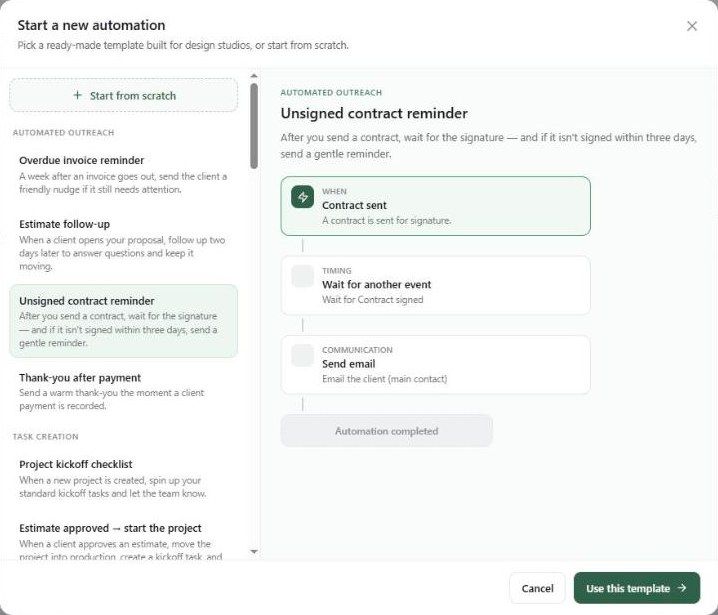
The Start a new automation window listing templates with a preview of the Unsigned contract reminder

What's in the library

Category

Templates

Automated outreach

Overdue invoice reminder · Estimate follow-up · Unsigned contract reminder · Thank-you after payment

Task creation

Project kickoff checklist · Estimate approved → start the project · Product approved → create order task

Claim windows

Claim window running out · Inspect the moment it arrives · Final call — window closing

Shipments & lead time

Silent shipment alert · Silent shipment → chase the vendor · Lead-time drift alert · Major slip → re-plan the schedule

Vendor reliability

Received → receive, inspect & log · Chronic late vendor → review & buffer · On-time delivery → note the win

Install confidence

Install confidence dropped · Confidence below 60 → expedite at-risk items · Critical (below 40) → escalate & re-plan

Budget thresholds

Scope creep alert (change orders vs budget) · Change orders 20% → paper it now · Allowance overrun alert · Allowance 50% over → prep the client talk

Client cascades

Delivery slipped → review the client update · Install at risk → review the whole cascade · Scope over budget → review the change-order cascade

Lead pipeline

New lead welcome + follow-up · Stale lead nudge · Lead won → start onboarding

Templates teach the patterns. Even if you prefer to build your own, open a few to see how delays, conditions and reminder loops fit together.