Installation Report
Written By Timothy Murenzi
Overview
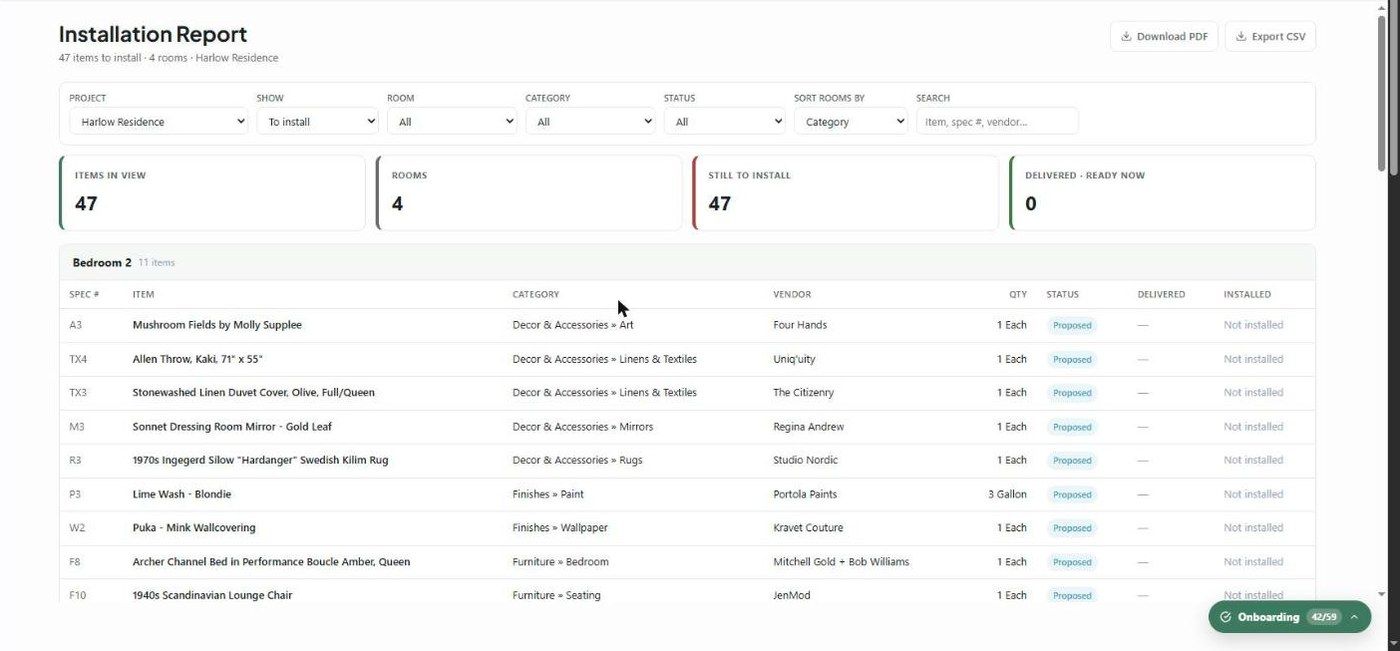
The Installation Report is an install-day checklist: what's going into each room of a project and what's still outstanding. Open it from Reports → Installation Report.
How it's organised
Pick a Project (required). Items are grouped by room, with a table for each room. The subtitle summarises the view, e.g. 47 items to install · 4 rooms · Harlow Residence.
KPI cards
Items in view
Rooms
Still to install
Delivered · ready now — delivered but not yet installed, so you can install them today
Columns
Spec #, Item, Category, Vendor, Qty, Status, Delivered date, and Installed (a date, or Not installed).
Filters
Project
Show — To install (the default), Installed or All
Room, Category and Status
Sort rooms by
Search by item, spec # or vendor
Export
Use Download PDF for a clean, room-by-room printable checklist, or Export CSV. This report has no Send Report option.
What to understand
An item's room comes from the product's location. An item counts as installed once it has an installation date in procurement.
Related articles
Products Report
Was this helpful?
Still need help? Ask the team