Billable vs. non-billable time
Understanding the difference between billable and non-billable time entries and how each affects your invoicing.
Written By Julia M.
Overview
Every time entry is Billable or Non-billable. Billable time can be pulled onto a client invoice; non-billable time is tracked for your own records and counts toward hours tracked but not toward billable %.
Examples
Billable: design work, drafting, site visits, consultations, procurement, project management.
Non-billable: internal meetings, admin, business development.
How it's set
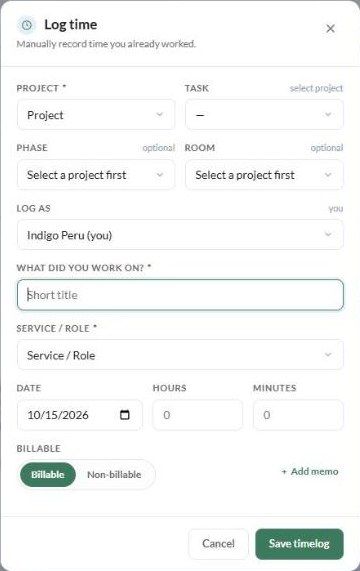
From the Service / Role. When you pick a service while logging time, the Billable toggle follows that service. For example, choosing Admin switches the entry to Non-billable.
By hand. Use the Billable / Non-billable toggle in Log time, Start a timer or Edit timelog to override it.
On the list. Click the BILLABLE / NON-BILLABLE pill on an entry to change it, or select several entries and use Set billable.
Where it shows
The Billable % tile on the Timelogs page, with billable and non-billable hours underneath the totals.
The Type filter (All types, Billable, Non-billable).
The invoice Library's Timelogs tab, which has a billable filter.
Before you start
Services and roles, and whether each is billable, are set up in Settings → Studio → Projects and phases → Services and roles. Setting them up correctly saves you changing the toggle on every entry.
Related articles
Tracking Time
How to invoice your time entries
How to manage and filter your timelogs
Was this helpful?
Still need help? Ask the team