Overview of Contacts
An overview of the Contacts module in Indema -- what it does, how contacts and vendors differ, and how to navigate it.
Written By Julia M.
Contacts is your studio's address book: clients, vendors, contractors and your own team. Open it from Contacts under PEOPLE in the left sidebar.
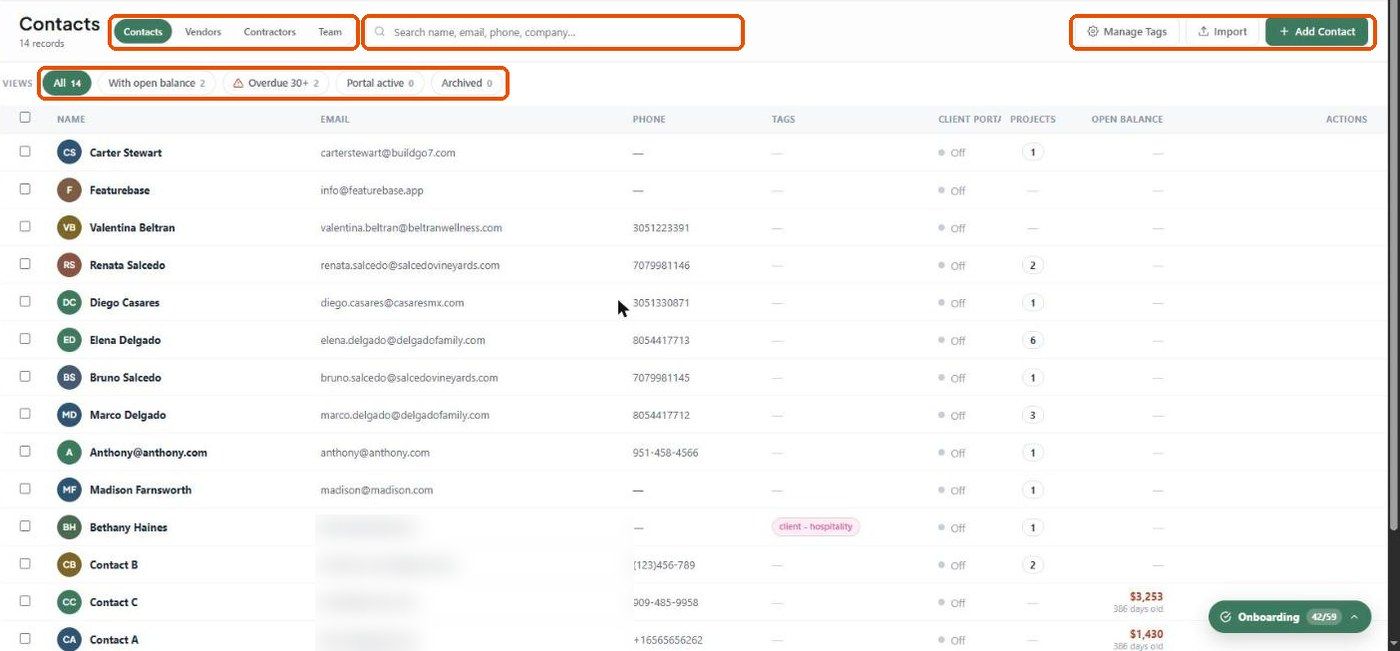
The four record types
Switch between them with the tabs at the top of the page:
Views
Quick filters under the title, with counts:
Contacts: All, With open balance, Overdue 30+, Portal active, Archived.
Vendors: All, With open POs, Credentials saved, Archived.
Team: All, Needs attention, Pending invites, Departed.
Search
The search box (Search name, email, phone, company…) filters the list as you type and suggests matching fields. See Smart Search.
Actions on this page
Add Contact / Add Vendor / Invite Team Member (the button changes with the tab). See How to add a contact and How to add a vendor.
Manage Tags — see How to use tags in contacts.
Import — see How to import contacts and vendors.
Tick rows with the checkboxes for bulk actions, or use the Actions column on each row.
What happens next?
Click any name to open its profile. A client's profile shows their details, portal access, projects, look-and-feel overrides, activity, notes and credits. A vendor's profile shows basic info, reps, pricing, activity, notes and purchase orders.
Important limitations
If you can't add or edit records, check your permission set (Settings → Studio → Team and rates → Permission sets).
Related articles
How to add a contact
How to add a vendor
How to use tags in contacts
How to import contacts and vendors
Adding your team
Was this helpful?
Still need help? Ask the team