Sharing your form
Written By Timothy Murenzi
Once a form is published, share its link or embed it on your website.
Share the link
After you click Publish, the builder header shows the public link (e.g. /f/c6cnam76cbqz). Click it to open the live form, then copy the address from your browser to send by email, text or QR code. The link also appears on the form's row in the Forms list.
Links use a random 12-character code that can't be guessed. If a link is shared somewhere it shouldn't be, open Form settings → Public URL and click Regenerate — the old link stops working.
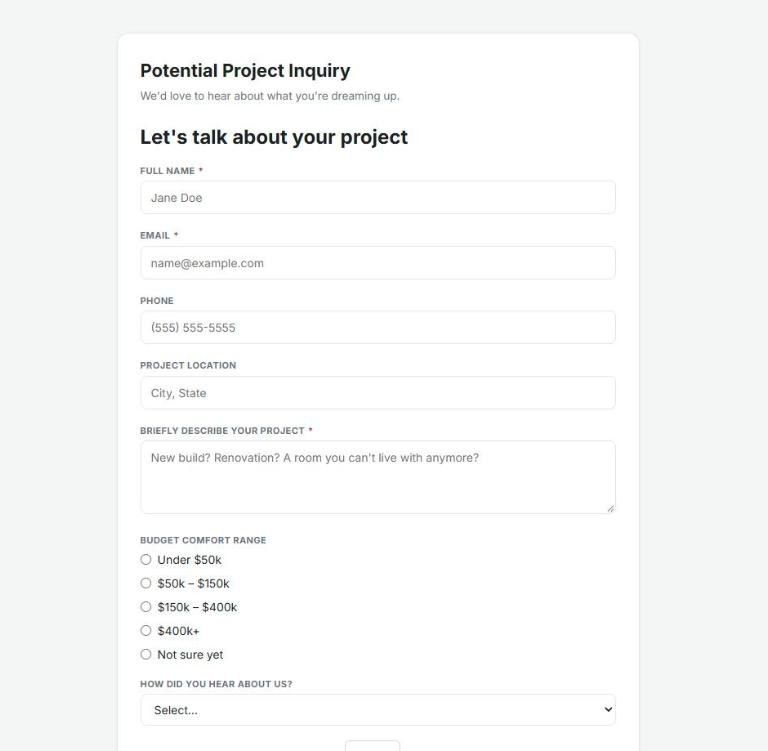
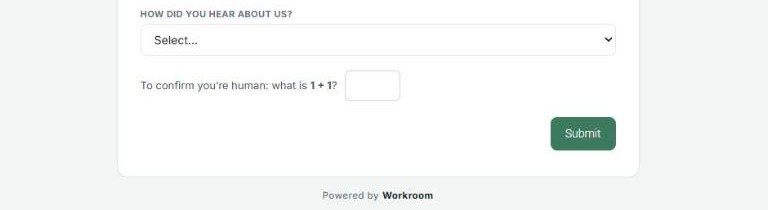
At the end of the form, respondents answer a quick "are you human?" check before Submit. A small "Powered by Workroom" credit appears under every form.
Embed it on your website
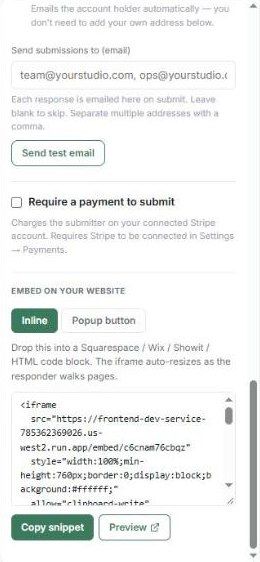
In the builder, scroll the right panel to Embed on your website (the form must be published first).
Choose Inline (the form sits in your page) or Popup button (a button that opens the form).
Click Copy snippet and paste it into a Squarespace, Wix, Showit or HTML code block. Click Preview to check it.
The embedded form resizes itself as the responder moves between pages.
Make it look like your brand
See Custom branding on the public form for the header image, accent colour, fonts, button style, thank-you message and embed background.
Get notified
In Form settings:
Email me on each submission — emails the account holder automatically.
Send submissions to (email) — add other addresses, separated by commas. Click Send test email to check delivery.
Take payment with a form
Tick Require a payment to submit to charge the submitter through your connected Stripe account (connect Stripe first under Settings → Payments). The submit button changes to "Continue to payment".
To take a form offline, open it and click Unpublish.
Was this helpful?
Still need help? Ask the team