Understanding Product Changelog
Track product updates, financial changes, and procurement history automatically.
Written By Julia M.
Overview
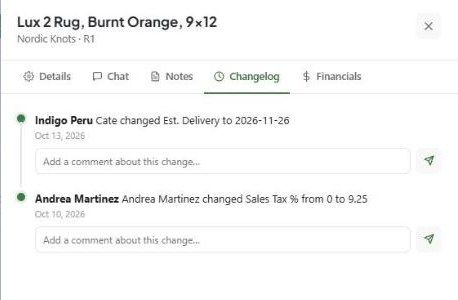
Every product keeps a Changelog: who changed which field, from what to what, and when. You can add a comment under any change to explain it.
View the changelog
Open the product (Library → expand the row → Open full details).
Click the Changelog tab.
Each entry shows the person, the change (for example changed Sales Tax % from 0 to 9.25) and the date.
Comment on a change
Type in Add a comment about this change… under the entry and click send. Use it to record why a price, date or status changed.
When it helps
Reconciling a price difference with a vendor or client.
Handing a project to a colleague.
Checking when a delivery date moved.
Related articles
Using Product Notes and Team Chat
Managing Product Financials
Was this helpful?
Still need help? Ask the team