Forms

Form Permissions

Written By Timothy Murenzi

Control who can see and do what in Forms with permission sets.

Change Forms permissions

  1. Go to Settings → Studio → Team and rates.

  2. Under Team members, check which permission set each person has.

  3. Under Permission sets, click the set you want to change.

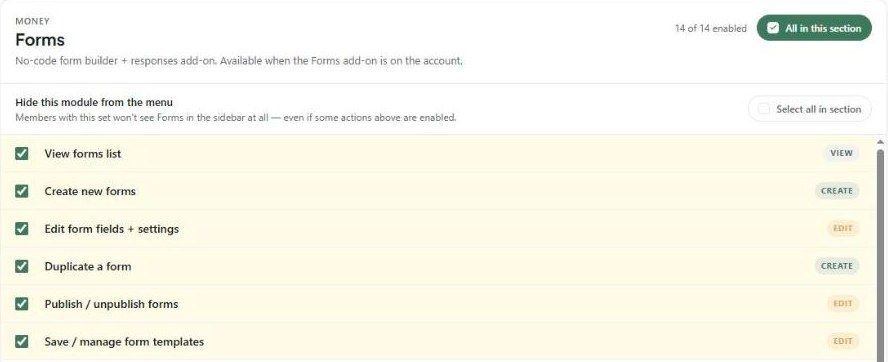
  4. Type "form" in Search permissions (or scroll to Money → Forms) and click Forms.

  5. Tick or untick the actions below, or use All in this section.

  6. Click Save & close.

The Forms section of a permission set

The 14 Forms permissions

Permission

Allows

View forms list

See Forms in the sidebar and the list of forms.

Create new forms

Use + New form.

Edit form fields + settings

Change forms in the builder.

Duplicate a form

Make copies.

Publish / unpublish forms

Make forms live or take them offline.

Save / manage form templates

Save and manage studio templates.

View submitted responses

Open Responses.

Export responses

Download response data.

Attach response to a project

Link responses to projects.

Create project from response

Start a project from a response.

Create estimate from response

Start an estimate from a response.

Archive forms

Archive forms.

Delete forms

Delete forms.

Delete a response

Remove individual responses.

To hide Forms completely from a set, tick Hide this module from the menu in the same section. Permissions only apply if Forms is enabled for your workspace.