Service & Activity Types
How to set up and manage service and activity types in Indema
Written By Julia M.
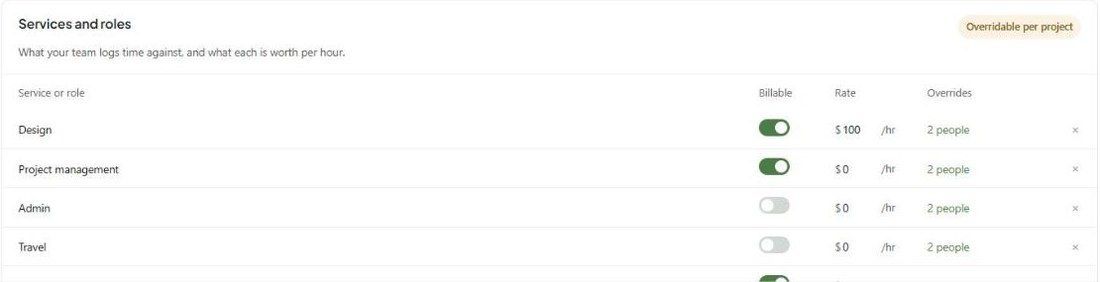
Services and roles (sometimes called service or activity types) define what your team logs time against, whether it's billable, and what each hour is worth.
Where to find them
Settings → Studio → Projects and phases → Services and roles. Searching settings for "service" takes you straight there.
Add a service or role
Click + Add a service or role.
Name it — e.g. Design, Project management, Admin, Travel or Procurement.
Turn Billable on or off. Billable services can be added to estimates and invoices. Non-billable ones track time only.
Enter the default Rate per hour.
Click Save changes.
Use × to remove a service.
Rate overrides
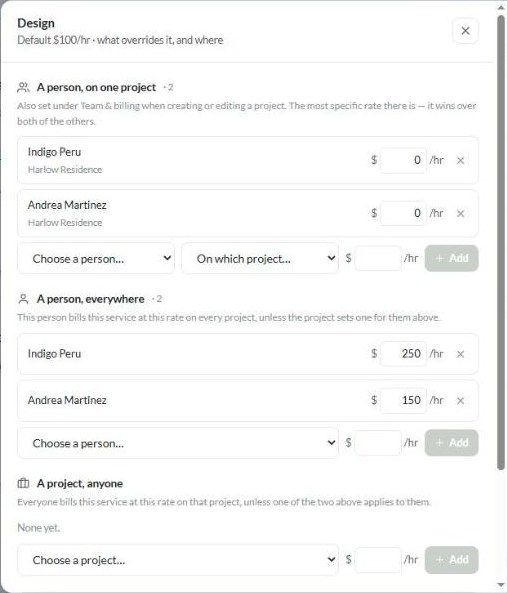
Click the Overrides link (e.g. 2 people) to open that service's rate rules ("Default $100/hr · what overrides it, and where"). Three levels, most specific first:
To add an override, pick the person and/or project, enter the rate and click + Add. Use × to remove one.
Example
Design defaults to $100/hr. Indigo bills Design at $250/hr everywhere, and Andrea at $150/hr. On Harlow Residence, both are set to $0 (a courtesy project). So:
Andrea on Harlow → $0
Andrea on another project → $150
A new designer with no override → $100
Good to know
Changes apply going forward. Time already logged keeps its rate and billable status.
Yearly increases are handled by Scheduled rate increases. They raise every rate on the project, including overrides.
On the same page, How time is logged controls start/end-time entry and whether admins can log time for someone else.
Was this helpful?
Still need help? Ask the team