Managing Procurement Tracking
Track ordering, shipping, delivery, and installation progress across products and projects.
Written By Timothy Murenzi
Overview
Each product carries procurement dates and shipment tracking so you can see where it is between approval and installation.
Procurement dates
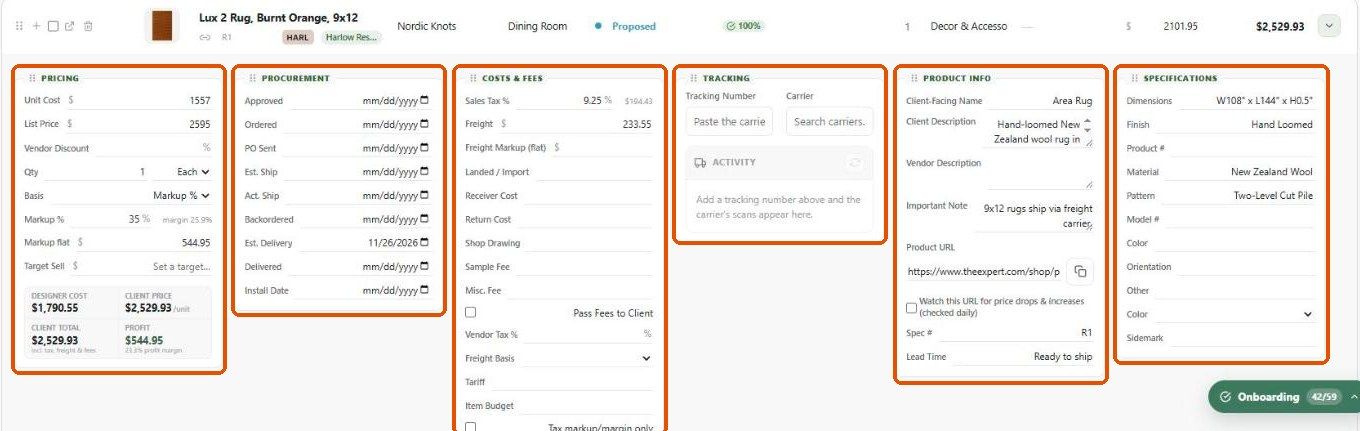
Expand a row in Library (or open the product → Procurement) to fill in: Approved, Ordered, PO Sent, Est. Ship, Act. Ship, Backordered, Est. Delivery, Delivered and Install Date.
Shipment tracking
In the Tracking panel, paste the Tracking Number and choose the Carrier.
The carrier's scans appear under Activity.
Where the dates show up
Calendar — deliveries and order-by dates.
Reports — turn on Procurement and Tracking in a Spec sheets layout, or add them as Schedule columns.
The On PO column shows which purchase orders include the product.
Best practices
Keep estimated and actual dates separate.
Add tracking as soon as the vendor confirms shipment.
Related articles
Working with Product Statuses
Dates that move on their own
Was this helpful?
Still need help? Ask the team