Keyboard shortcuts
How to view and use keyboard shortcuts in Indema.
Written By Julia M.
Keyboard shortcuts let you create records and jump between pages without reaching for the mouse.
See your shortcuts
Click the ⌘ button in the top header, beside the search bar. A panel lists every shortcut.
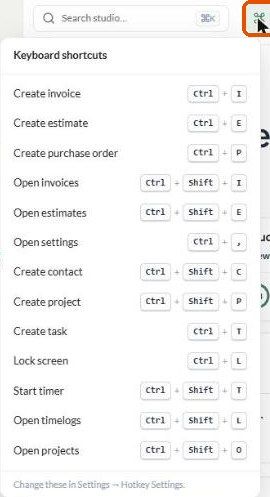
Default shortcuts
On Windows, use Ctrl. On a Mac the panel shows the matching keys.
Change a shortcut
Go to Settings → You → Keyboard shortcuts.
Use the toggle to turn a shortcut on or off.
Pick the modifier keys (Ctrl, Shift) and the letter from the dropdowns.
Click Save Changes. Use Reset to Defaults to undo all your changes.
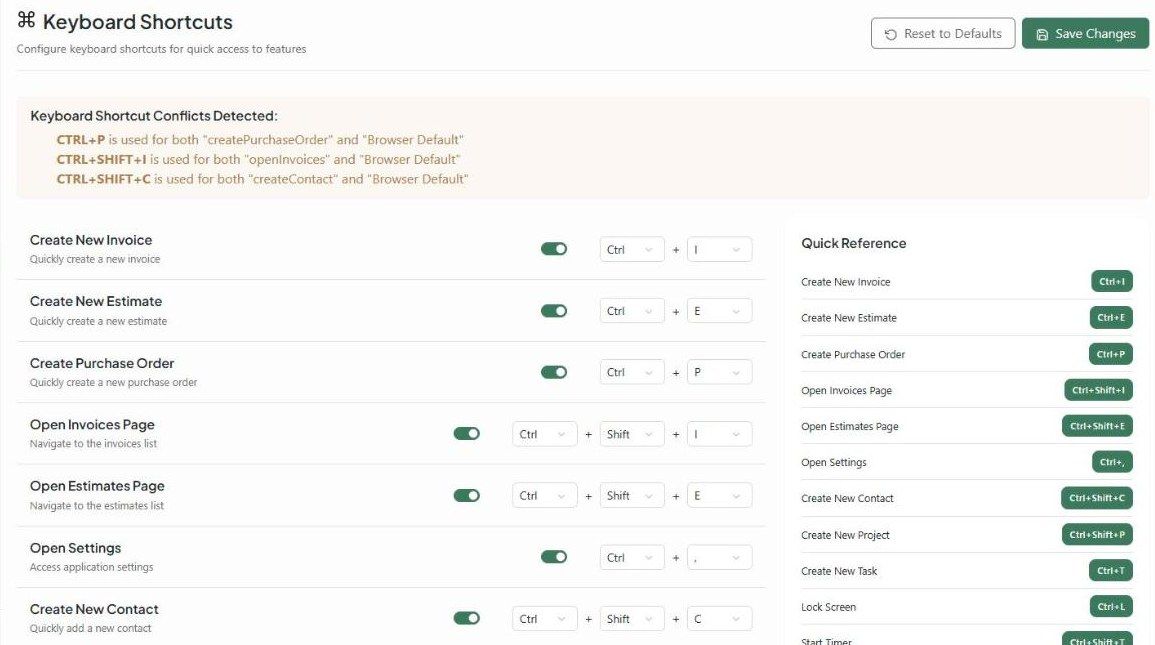
Watch for conflicts. The settings page warns you when a shortcut clashes with your browser. For example, Ctrl + P (print), Ctrl + Shift + I (developer tools) and Ctrl + Shift + C can be taken by the browser first. Pick a different key if one doesn't work.
Shortcuts are personal to you. The Quick Reference on the right of the settings page shows your current set.
Was this helpful?
Still need help? Ask the team