Purchase Order Report
Written By Timothy Murenzi
Overview
The Purchase Order Report is your accounts-payable and procurement picture: what you owe vendors and where orders are stuck. Open it from Reports → Purchase Order Report.
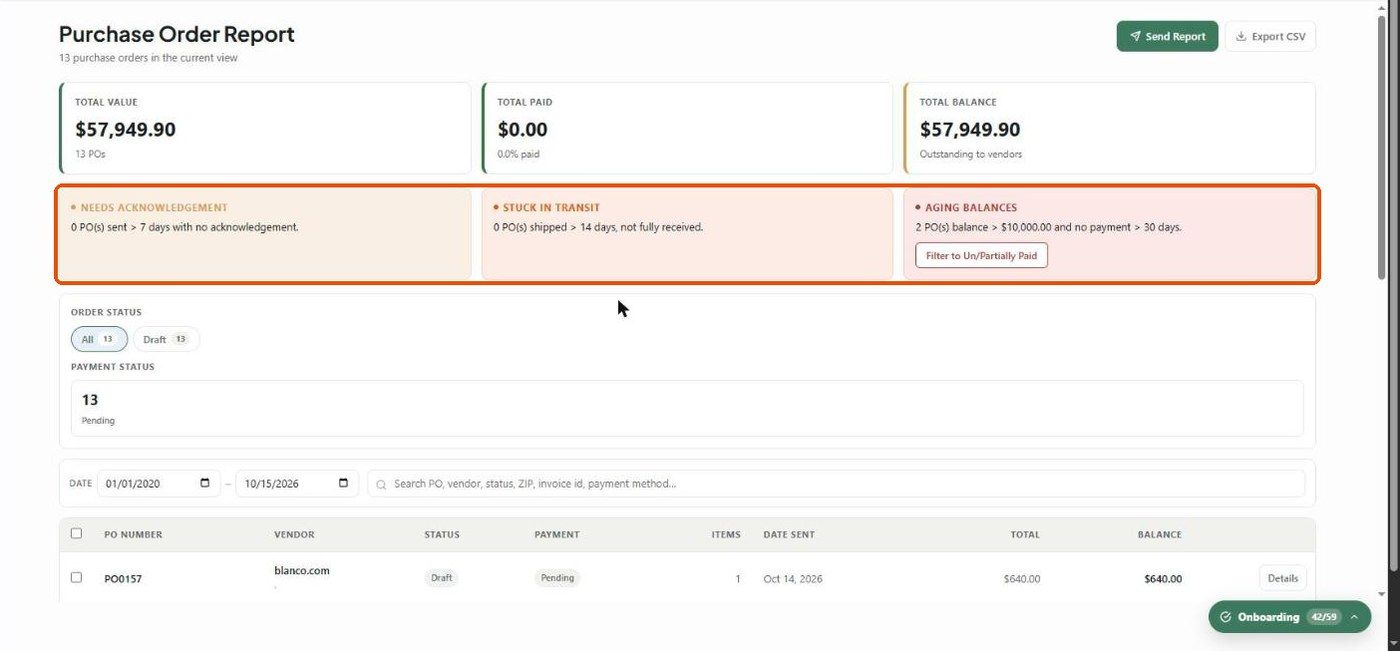
KPI cards
Total Value — the sum of PO totals
Total Paid — with % paid
Total Balance — outstanding to vendors
Insight cards
Needs Acknowledgement — sent more than 7 days ago with no vendor acknowledgement.
Stuck in Transit — shipped more than 14 days ago and not fully received.
Aging Balances — balances over $10,000 with no payment in more than 30 days. Click Filter to Un/Partially Paid to see them.
Table
Select checkbox, PO Number, Vendor, Status, Payment, Items, Date Sent, Total, Balance and Details. Rows can be selected in bulk.
Filters
Order Status and Payment Status (built from your live POs), a date range (date sent), and search by PO, vendor, status, ZIP, invoice ID or payment method.
What to understand
The insight cards are the fastest way to catch unacknowledged orders, shipments that never arrived, and large aging balances before they turn into delivery or cash surprises.
Related articles
Reports — Overview
Was this helpful?
Still need help? Ask the team