The Portfolio / Forecast view
Written By Timothy Murenzi
The Projects view (previously Portfolio / Forecast) shows every project on one page, so you can see where each one stands and which ones need attention.
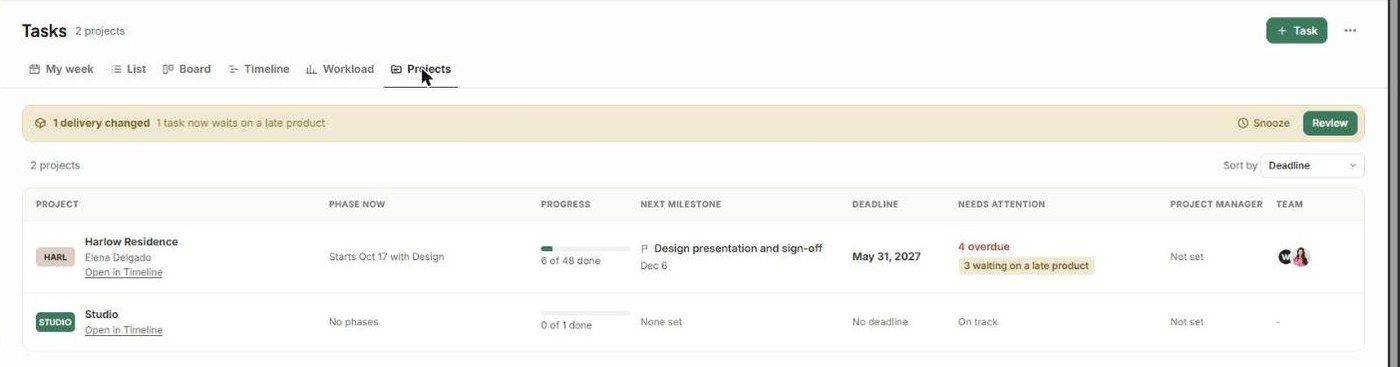
Columns
Project — name and client, with Open in Timeline.
Phase now — e.g. Starts Oct 17 with Design.
Progress — e.g. 6 of 48 done.
Next milestone — and its date.
Deadline
Needs attention — e.g. 4 overdue, 3 waiting on a late product, or On track.
Project manager and Team.
Use Sort by (e.g. Deadline) to order the list.
Forecasting
For a month-by-month roadmap across projects, open the Timeline with no project selected and set the scale to Months or Years.
The Timeline's "You can start your next project…" tip and its Why? link forecast when you have room for new work.
For people, use Workload. See The Utilization view.
Related articles
The Gantt (Timeline) view
The Utilization view (capacity planning)
Was this helpful?
Still need help? Ask the team