Importing Products
Written By Timothy Murenzi
Overview
Bring a spreadsheet of products into the Library.
Steps
In Library, choose the project in the Project dropdown.
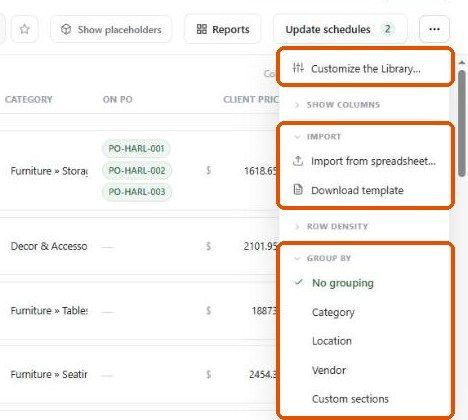
Click ⋯ and, under Import, click Download template. Always use a freshly downloaded template — it reflects your account's fields.
Fill in one product per row.
Click ⋯ → Import from spreadsheet… and choose your file.
Review what's coming in, fix any problems, and confirm.
Before you import
Use consistent product names, vendors, rooms (locations) and categories.
Check status values against Settings → Studio → Library and statuses.
Check prices and quantities are numbers.
Important limitations
We didn't run a full import during this review; confirm the preview step on a small file first.
Related articles
About Product Sourcing
Searching and Filtering Products
Was this helpful?
Still need help? Ask the team