QuickBooks Online Integration
Written By Timothy Murenzi
Connect QuickBooks Online and Workroom posts your documents and money movements to your books. Workroom stays the place you create estimates, invoices and POs, and QuickBooks holds the accounting.
Where to find it
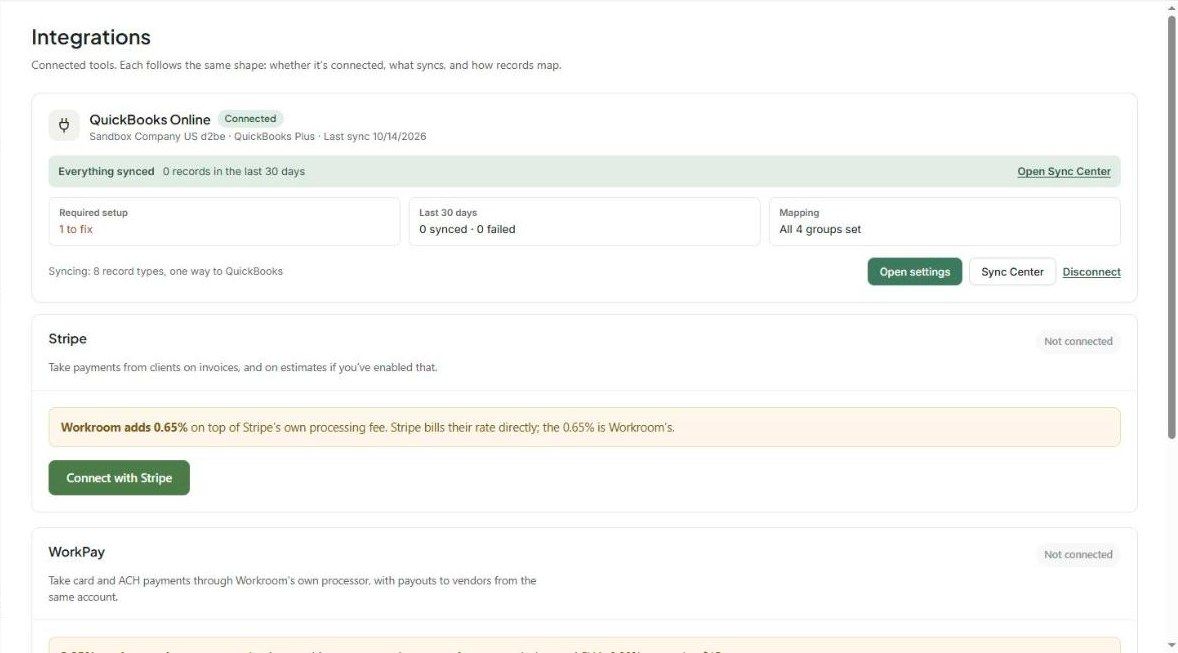
Settings → Studio → Integrations → QuickBooks Online. The card shows:
The connected company, plan and last sync
A health line (e.g. Everything synced)
Required setup, Last 30 days (synced / failed) and Mapping status
Open settings, Sync Center and Disconnect
Connect
On the Integrations page, connect QuickBooks Online and sign in to Intuit.
Pick the company file and approve access.
Back in Workroom, click Open settings. If Workroom has suggested mappings from your QuickBooks, use Review suggestions or Answer setup questions. Nothing changes until you apply and save.
Setup tab
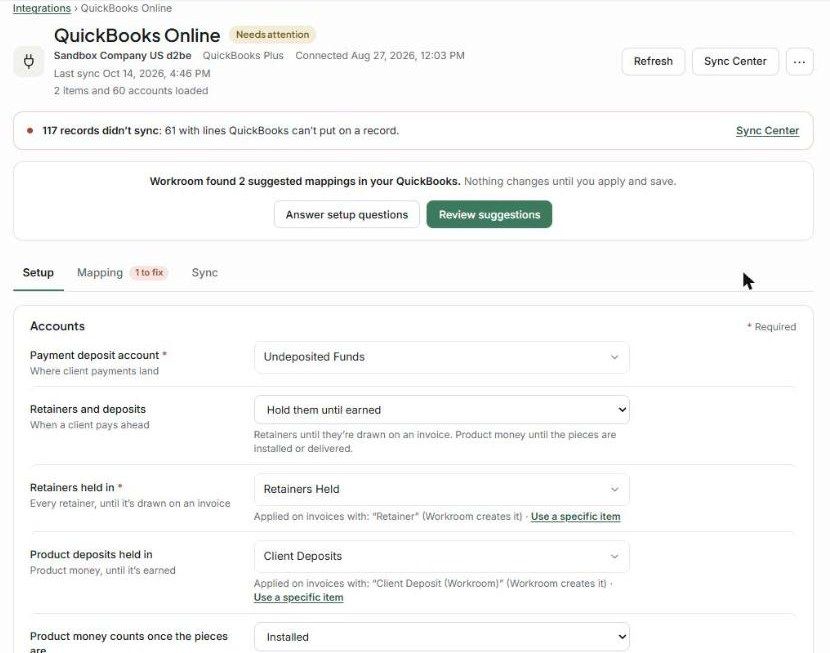
Choose where things post. Required fields are marked *:
Payment deposit account * — where client payments land (e.g. Undeposited Funds).
Retainers and deposits — Hold them until earned or Count them as income when received.
Retainers held in * and Product deposits held in — liability accounts. Workroom creates the "Retainer" and "Client Deposit (Workroom)" items, or you can use a specific item.
Product money counts once the pieces are — Invoiced, Installed or Delivered.
Product costs held in — so sales and costs land in the same month.
Product income *, Service income, Freight income, Warehousing and receiving income, Cost of goods sold * and Client sales tax payable *.
Sync records dated on or after — older records only sync one at a time, from their own menu.
Projects — post to a default customer, a customer plus a sub-customer per project, or a class per project. You can add per-project overrides.
Convert POs to bills — Never, when a PO is approved, or when a PO is received.
Closed months — when a document in a closed month changes, hold it for review in the Sync Center, or post it in the first open month.
Mapping tab
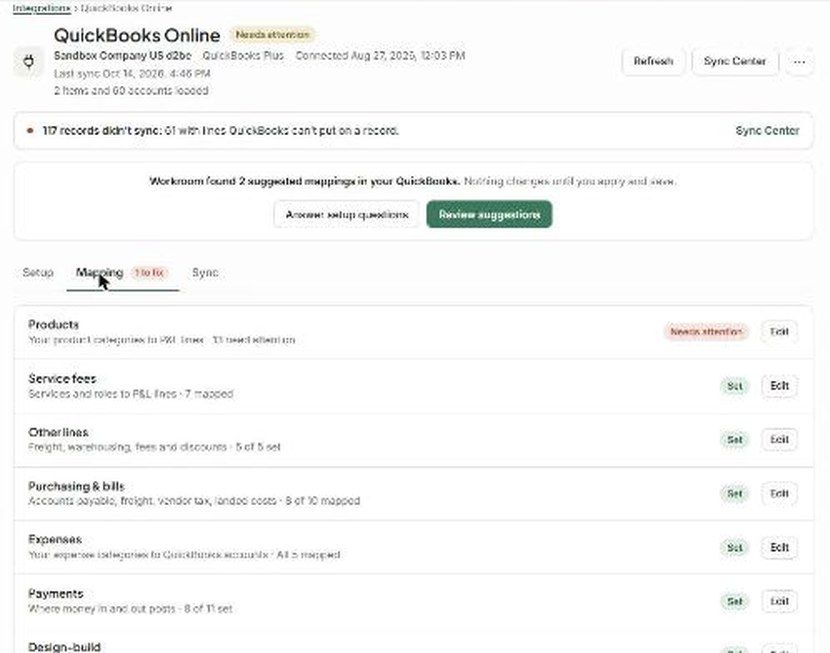
Map Workroom categories to QuickBooks lines. The tab shows a count of anything that needs fixing:
Products — product categories to P&L lines
Service fees — services and roles
Other lines — freight, warehousing, fees, discounts
Purchasing & bills
Expenses
Payments
Design-build — retainage and change orders
Each shows Set or Needs attention, with an Edit button.
Sync tab
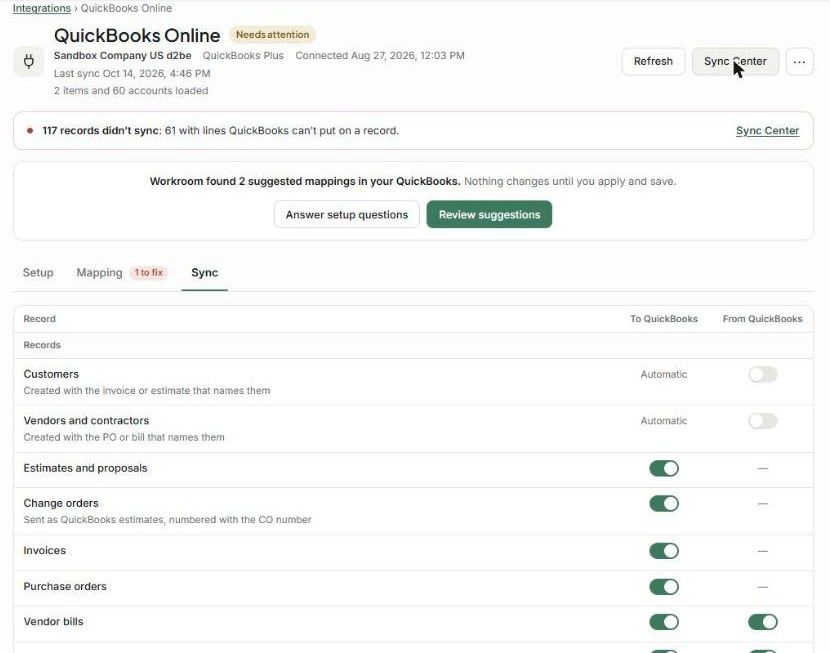
Choose what goes To QuickBooks and what comes back From QuickBooks, record by record:
Records: customers and vendors (created automatically with the documents that name them), estimates, change orders (sent as QuickBooks estimates), invoices, POs, vendor bills, expenses, and approved time entries.
Money in: invoice payments (and, optionally, payments recorded in QuickBooks pulled back onto the matching invoice), card and ACH payouts, product deposits and refunds, retainer payments and draws, form payments, and refunds or chargebacks.
Money out: vendor payments on POs, bill payments, WorkPay vendor payouts and staff reimbursements.
Attachments: the Workroom PDF, a link back to Workroom, and receipts or vendor files.
Sales tax: either Workroom calculates tax and sends the amounts (recommended), or QuickBooks calculates it. Pick one — using both adds tax twice.
When something doesn't sync
A red banner shows how many records didn't sync and why (e.g. 117 records didn't sync: 61 with lines QuickBooks can't put on a record). Open the Sync Center to see each failure, fix the cause (usually a mapping), and retry. Use Refresh to reload accounts and items from QuickBooks.
Troubleshooting
"Needs attention" badge. Open the Mapping tab and fix the group marked Needs attention.
An old document won't sync. It's dated before your Sync records dated on or after date. Sync it from its own menu.
Tax is doubled in QuickBooks. You're using both tax options. Choose one under Sales tax on the Sync tab.
Duplicate customers in QuickBooks. Make the Workroom client name exactly match the QuickBooks customer, then retry.
Was this helpful?
Still need help? Ask the team